One of the best things about Google’s Android apps is that they cover just about every major category, from email and web browsing to note-taking, music, file management, photos, and more. The best part is that these apps are all polished, incredibly easy to use, and deeply integrated into the wider Android ecosystem.
I use plenty of Google’s apps every day, and for the most part, I have few complaints—this isn’t another article about ditching Gmail or Chrome. My issue lies with a handful of Google’s apps, where I’ve found each one falls short in ways that eventually pushed me toward better alternatives. If you’ve never looked beyond Google’s ecosystem, this is for you.
Files by Google is convenient because it’s there, but it feels limited
Good enough for basic cleanup and downloads

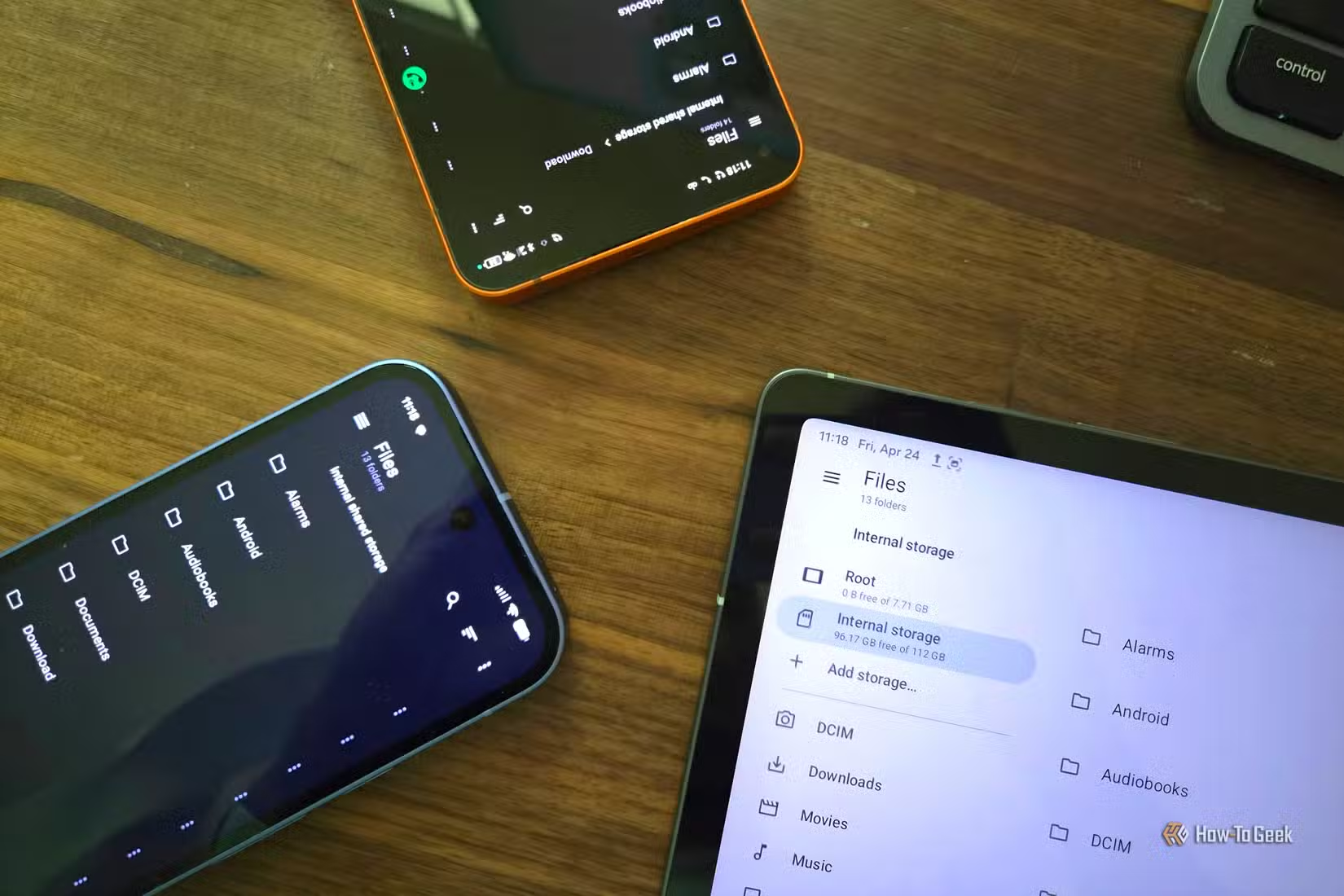
Files by Google (or just Files if you look in the app drawer) is Google’s first-party solution for browsing and managing files on your Android smartphone. Interestingly, despite handling such a core function, it’s also one of Google’s younger apps, officially launching in December 2017.
Now, if you’ve only ever used Samsung phones, you might not even know this app exists, since Samsung ships its own My Files app. Other manufacturers also include their own file explorers, likely because it took Google so long to ship its own.
- Brand
-
Samsung
- SoC
-
Snapdragon 8 Elite Gen 5
Get the new Galaxy S26 Ultra with AI smarts and an all-new privacy display. It’s big, powerful, packed with AI, and you’ll love the S-Pen stylus.
Despite arriving relatively late, Files by Google is one of the most basic file explorer apps on the market.
In a way, it’s the quintessential Google app: so middle-of-the-road that it’s almost hard to criticize. It’s not so limited that it becomes frustrating to use, but it also lacks the advanced file management tools that power users expect.
Sure, you can move, rename, copy, share, extract files, and handle all the basic operations you’d expect. You can even back things up to Google Drive with a single tap. Beyond that, though, most of the app is focused on storage cleanup and recommendations rather than deeper file control.
One of the biggest missing features compared to third-party file managers is network storage support. Since I use a NAS to move files between my phone and other devices regularly, I need quick access to local network folders directly inside my file explorer.
It’s also fairly limited when it comes to archives. While you can extract ZIP files, you can’t open RAR files or create archives, which becomes a real limitation if you ever need to send or transfer folders from your phone. The app also restricts access to certain system directories, including Android/data and Android/obb.
The good news is that there’s no shortage of alternatives that unlock most, if not all, of these missing features while adding plenty more on top. I’ve used quite a few over the years, and my three favorites are Material Files, Cx File Explorer, and Solid Explorer.
Google Keep is perfect for quick notes, but serious note-takers should move on
Sticky notes are great, but they’re no match for a notebook

Google Keep used to be my go-to notes app for well over a decade. It launched back in 2013, and for years, it felt like one of the most minimalist yet still surprisingly complete note-taking apps on Android.
The app essentially mimics the colorful aesthetics and behavior of sticky notes, letting you create quick notes and set reminders to get notified. You can add photos, audio recordings, color-code notes, and do a few other small things, but the core experience remains fairly basic.
There’s also a web version that I used to sync notes between my PC and phone. You can even share notes to collaborate with others, which is how my wife and I kept track of our ever-changing grocery list.
Unfortunately, Keep suffers from many of the same problems as real sticky notes. If you’ve ever used physical notes to track important things instead of a calendar or proper notebook, you know how easy it is to lose track of them. Once you have a few notes pinned, it becomes surprisingly easy to miss something important, even if you open the app regularly (which, in my case, I didn’t).
This over-reliance on Google Keep, combined with its relatively simple structure, led to a few forgotten or missed appointments, at which point I decided enough was enough.
Fortunately, there are plenty of other note-taking apps that do a much better job at, well, almost everything, including Markdown support. Some of the best alternatives are Obsidian, Notion, and Joplin (which you can also self-host).
I finally ditched OneNote and moved my life to this private, open-source vault
I switched to Joplin, a privacy-first alternative that offers end-to-end encryption and total control over where your data lives.
Google Photos is a good backup solution, but full control over your backups is better
Convenience comes at the cost of ownership
Google Photos is one of the most popular Google apps on the market. It’s saved countless precious memories that would’ve otherwise been lost without automatic backups. So I’m probably going to ruffle a few feathers by saying that I couldn’t be happier that I permanently got rid of it.
There are a few reasons why I don’t like Google Photos. First, I’m not a fan of the concept of paying for cloud storage, especially for long-term backups. A few dollars a month doesn’t sound like much until you realize you’ll be paying it indefinitely just to keep your data accessible. At that point, it feels more cost-effective to invest in a couple of hard drives and even flash drives and build your own redundant backup setup.
Another issue with Google Photos is image compression if you choose the storage-saving option. Even if it’s convenient, you’re still trading quality for space.
There’s also the privacy and security aspect. While cloud storage is generally secure, I still prefer having full ownership and control over some of my most sensitive data.
Finally, I just got tired of constantly dealing with a full Google account, no matter how many images I deleted. I’ve replaced Google Photos with Immich, a self-hosted alternative running on my NAS, and I couldn’t be happier.

How I ditched Google Photos and built my own photo server
Goodbye Google.
YouTube Music works fine, but better solutions for music exist
Music streaming is about more than just having a large catalog

YouTube Music is built on the foundation of YouTube, so it’s no surprise that it has one of the largest music libraries in the industry by a wide margin. It doesn’t matter how niche a slowed-down remix of a remixed track you’re looking for; if it exists anywhere online, chances are it’s on YouTube Music.
But the problem with YouTube Music isn’t the catalog; it’s the lack of focus. It’s tightly tied to your YouTube viewing habits, so anything you watch on the video platform can end up influencing your music recommendations. On top of that, a large portion of the content is essentially just repackaged YouTube videos, which makes the experience feel a bit inconsistent and, at times, redundant.
Honestly, there’s very little reason to choose YouTube Music over competing streaming services like Spotify or Tidal. In many cases, even building your own local setup or streaming solution is the better long-term option.
And if you prefer listening to a local library, YouTube Music is honestly not great at it. There are plenty of dedicated apps that handle that experience much better, such as Oto Music and Retro Music Player.
Google apps are a strong baseline, but the alternatives are just too good to ignore
Google apps are the perfect starting point when you’re new to Android or have just bought a new phone and haven’t explored all the options yet. They provide a familiar experience that makes them easy to use on any device.
However, once you realize just how many better options are out there, it becomes much harder to stick with the default choices. So I encourage you to start exploring and find the apps that suit you best instead of relying solely on Google’s basic offerings.
I de-Googled my Android phone and actually liked it
And you can safely demo it in seconds without installing anything.