The holy grail of 3D printing is here; just grab a photo of a real-life item with your phone and convert it to a 3D printing file. Send that to your printer, and boom, you have a 3D printed copy.
After a few tries with some less-than-successful apps, I found one that actually works as advertised, super easily and with very little effort. The only issue is that it costs and it uses AI, but with those two caveats, Meshy AI is the way to go.
I started with Reality Scan
Not super easy or successful

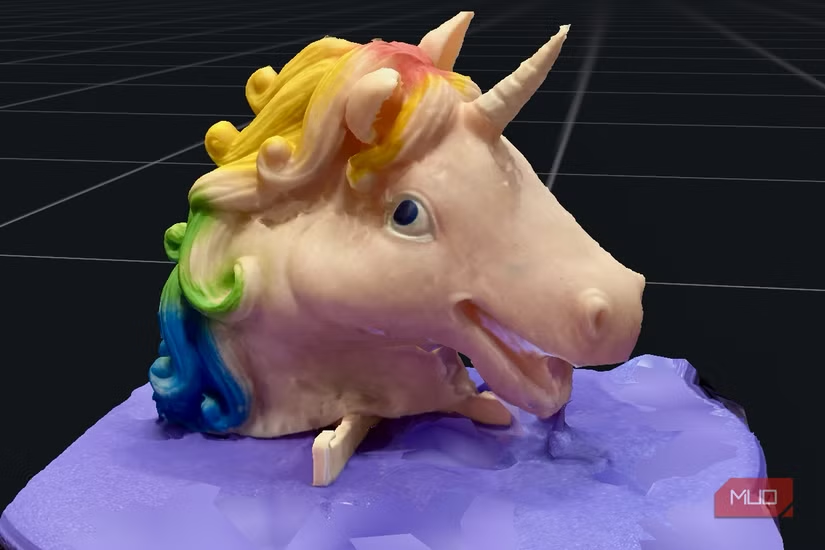
I started my print a real object journey with Reality Scan, a highly-recommended app for turning your real life things into 3D prints. I tried taking photos of a unicorn doll head for a friend of mine, using a couple of different systems included in the app, and, well, it didn’t work real well.
The first try ended up with a great scan of my coffee table, with a hole where the doll head should have been. The second scan, which required a turntable I printed myself, came out much better, but still wasn’t print-ready. It got the whole head, for sure, but also brought in bits of the turntable, too. I’m not one to edit a 3d file, so this wasn’t the solution for me.
Meshy AI is almost like magic
It’s surprisingly accurate
Yes, AI is bad for the planet and our brains in general, but this app makes turning real objects into 3D prints so easy that you might overlook that fact if you need the functionality.
Honestly, I grabbed my Roku remote, a tiny Grogu figurine, my AirPods case, and a McDonald’s Godzilla/Hello Kitty figure and took a single photo of each. I made sure there was no clutter in the background of either photo, and used my white kitchen table with good lighting (it’s near a window) for the picture.
Then it was as simple as uploading the photos to Meshy.ai. I used the website version of the app, though there’s a mobile version for Android. If you’re an iOS user, you can use the mobile web app version.
Once uploaded, you simply hit Generate and the app will turn your photo into a super accurate 3d printing file in minutes. Meshy “charges” you coins for each generative pass, and while I got 140 or so to start, they go quickly. The small figures cost me 20–40 coins per model.
The accuracy really surprised me. The photo I took of the Grogu figureine has the baby in his little ship, and I had left the Mandalorian’s gun inside it. Meshy somehow extrapolated the gun and the insides of the ship, including the rest of Grogu, and put it all into the model. This is a fully 3D copy of this figurine produced almost immediately.
The subscription model
Meshy will charge you

Creating the 3D models was free and easy, but when it came to downloading them so I could actually print them was when I got the paywall. Meshy charges you to download the files, putting that feature, and a few others, behind its Pro subscription, which is $20 a month if you go monthly, or $12 a month if you purchase annually.
Meshy.ai’s individual plans are built around monthly credits, with pricing currently showing a discount when billed yearly. The Free tier is $0/month with 100 credits, 1 concurrent task, and low queue priority.
The Pro tier is normally $20/month but is currently $16/month when purchased as an annual subscription ($192 today, about 2 or 3 months free), giving 1,000 credits/month, 10 concurrent tasks, high queue priority, and 60% faster generation.
Meshy charges you to download the files, putting that feature, and a few others, starting at its Pro subscription.
The Premium tier is normally $40/month but currently discounted to $12/month when billed yearly ($144 today, about 8 months free), with 3,000 credits/month, 30 concurrent tasks, higher queue priority, and 80% faster generation.
The Ultra tier is usually $100/month but you can get it now for $80/month if you pay for the whole year ($960 today, about 3 months free). This tier includes 8,000 credits/month, 100 concurrent tasks, and the highest queue priority.
Paid tiers also add unlimited 3D model downloads, unlimited animation, and access to Meshy’s 3D Agent, with Premium and Ultra layering in early feature access and Creative Lab image generations.
Since Meshy runs limited-time promotions like this launch discount, it’s worth checking the live pricing page for current rates before you subscribe.
Meshy just makes this easy, which will probably earn my money over time
This is not a paid advertisement for Meshy. I paid for one month at $10 for the Pro tier, just so I could try it out. Honestly, I can see the value in being able to take a photo of a part I need more of, or make a mockup in cardboard or clay and then turn that into a 3D object. Or, like the unicorn head my friend wanted printed, stl files for things that just aren’t on any of the 3D printing sites out there. While I don’t personally have a need for a mothly subscription, even at the lower Pro level, I definitely plan on purchasing a month at a time as I need the service. It makes turning real objects into printable files so easy even I can do it.