Nowadays, Android phones have become much more than devices of connection, especially for photographers. Hobbyists and pros alike appreciate the convenience of editing spaces in their pockets. To match this demand, the best Android photo editor must handle far more than basic cropping or filters. It should recover detail, correct color, clean up distractions, and shape a consistent visual style before the photos even touch a computer.
In this article, we will look at some of the best apps for photo editing on Android that fit different needs and skill levels to help you find a tool that improves your images without making the process feel slow, technical, or frustrating.
1. Luminar Mobile
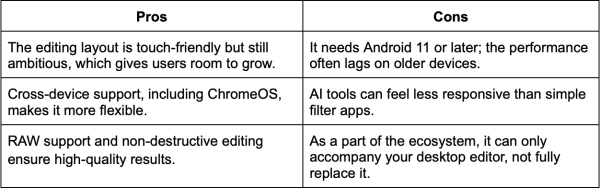
When you edit photos on Android, you hope to achieve results quickly without spending time on technical nuances. Luminar Mobile’s photo editing approach is based on it. The software’s AI-based enhancements suit different genres, from portraits to landscapes. Manual tools help maintain realism in pictures and evolve your skills within a convenient environment. The Android app can be bought only as a part of a large desktop-based ecosystem in Cross-device (~$149) and Max (~$160) tiers.

2. Snapseed
This photo editor app for Android can be a strong choice for users on a budget who want more control than a basic gallery editor offers. The toolkit includes Healing, Brush, Structure, HDR, Perspective, RAW Develop, Selective, Face Enhance, and other tools for free with no in-app purchases or any other forms of financial commitment.

3. Lightroom Mobile
This mobile photo editor is aimed at skilled photographers who prioritize a full-scale, uninterrupted, cross-device post-processing workflow. The app supports RAW editing, masking, AI-driven Quick Actions, and cloud sync for people who move across devices. The core app is free to download, and premium options start at $4.99/month.

4. Picsart
This image editing app blends photography, design, and AI-based creativity in one place. It is an all-in-one platform with standard photo and video editing tools, templates, stickers, design assets, and AI tools for people who want creative experiments beyond basic corrections. The core app is free to download, but there are also Pro (~$13/month) and Ultra (~$45) versions with broader toolkits. The exact price depends on your location.

5. VSCO
VSCO is a good Android option for photographers who want their images to feel more intentional and stylish. It is a photo and video editor with a large preset library, manual controls, RAW support, and tools aimed at building a consistent visual style. You can download the app for free, but there are also paid options with more features. You can get Plus for $7.99/month or $29.99/year, and Pro for $12.99/month or $59.99/year.

Conclusion
The best image editing applications for Android in 2026 cater to a diverse range of needs and skill levels. By selecting the right tool, photographers can enhance their images seamlessly, ensuring that their creative vision is realized directly from their mobile devices.