I know that the apps on my smartphone are full of trackers. It’s an unfortunate part of modern life that most of what we do online or otherwise feeds straight into data collection for big business. Then I found a free Android app that lays it all out and explains exactly what all the apps on your Android device are tracking. Exodus Privacy is free, incredibly simple to use, and for me, was a timely reminder that I’ve got unused apps going back years lurking — and potentially getting away with more than I realize.
Every Android app comes with baggage
But did you really agree to it?

I’ve worked in tech for years and covered the security and privacy beat for long enough that, deep down, I know the majority of Android apps are tracking you in some way. It’s an unfortunate side-effect of receiving most apps for free; they want their pound of digital flesh.
There is also some confusion when it comes to trackers and permissions. All apps request permissions to access specific data or settings on your device. You download Uber, and naturally, it wants to access your location. Or, if you download a camera app like Snapseed, it’ll ask for permission to use your camera and location.
Most of the time, permission requests are benign and are required to let an app work properly, or at least so you can use its full range of functions. There are definitely times when apps ask for too many permissions, mind, but over the years, Google has made Android apps safer in this regard.
Trackers are different. Most of the time, trackers are third-party software libraries baked into the app itself that deliver all kinds of information to the owners or other parties. Some of it is totally above board, like crash reporting and A/B testing tools. Other trackers, such as advertising tools like Meta Audience Network and Google AdMob, are more frustrating and certainly more of a privacy problem.
The thing is, a glance through your Android app list won’t reveal any of this. You can check permissions, sure, but you can’t have a perusal of the various trackers shipped with each app. Rightly or wrongly, app developers don’t want you to do that.
That’s exactly why you need Exodus Privacy.
Exodus Privacy reveals the privacy risks hiding in plain sight
It’s wonderfully simple to use
Exodus Privacy is an open-source project that maintains a public database of known tracker signatures — code patterns associated with specific third-party SDKs. When you scan your apps, it matches what’s installed against that database and shows you what it finds.
The easiest way to use Exodos Privacy is to download its free Android app and let it run on your device. It only takes a minute or two to check your apps against its database, then it returns with a breakdown of what all those apps are doing.
What I also like about Exodus Privacy is that it doesn’t send your data anywhere, and all the checking is done locally. You also don’t need an account and password, which is another bonus. So, props to Exodus for being a privacy app that practices what it preaches.
Everything is tracking me all the time
Time to start clearing house?
The list of apps looks overwhelming to begin with, especially if you have heaps of apps installed. But on closer inspection, it’ll all begin to make sense.
For example, social media apps like Instagram and Facebook come packed with Meta’s trackers, as you’d absolutely expect and can’t really be that surprised by. Amazon’s apps feature Amazon’s Advertisement trackers… You get the gist.
It’s typically other apps that’ll catch you off guard. Scrolling through the list, I found a bike-hire app specific to where I live in Cornwall, with a big red number five alongside it. Opening it showed me that the Beryl app ships with AdMob, Firebase Analytics, Mapbox, Segment (behavioral profiling), and Sentry (crash reports). Mostly benign, in fairness, but more than I was expecting to see from an app that lets me unlock an ebike.
There are also some surprising wins on this list. WhatsApp isn’t tracking me, apparently, and neither is Telegram. Add to that Chrome, Gmail, and Gemini. More than a little surprising, that’s for sure, given the reputation of those apps.
It’s not always as bad as it seems
And the worst app I found on my phone?
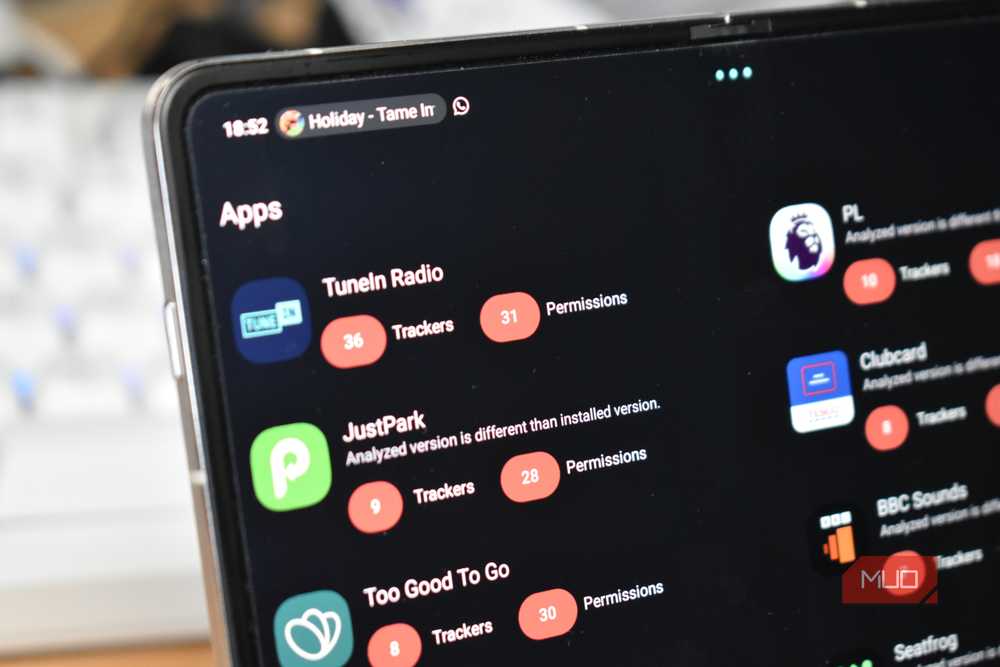
TuneIn Radio, by a LONG stretch, with 36 different trackers, covering seemingly every advertising network it can possibly list. I mean, come on: 36 different trackers, all collecting my data? That’s insane.
But on closer inspection, is it? I haven’t had this confirmed, but I’d wager that TuneIn Radio’s enormous number of trackers isn’t just because they want to pillage every last bit of your data. It’s the nature of engineering an app with a truly global audience tied into several different advertising networks. So, instead of just pushing out with AdMob, TuneIn Radio ships with 36 different trackers that are only activated depending on where you live (or rather, use the app).
Seeing 36 trackers is definitely alarming, but it doesn’t automatically translate to 36 different data pipelines siphoning your details. Still, given I haven’t used this app in years, it was enough to make me press Delete at long last.
There are other alternatives, too
First reaction is always to clean house and remove everything. Removing apps you haven’t used in years (a la TuneIn Radio for me) is an important privacy step everyone should take periodically. What’s the point in keeping an app around if you haven’t used it in half a decade?
I’d suggest being brutal here, too. Unless it’s a vital app, Google Play is always a tap away, and realistically, how often are you without data or Wi-Fi these days? Download stuff as you go if you need to, and give yourself a bit of a digital spring cleaning.
While you’re at it, give your Android app permissions a scan and check anything untoward. Google has massively improved Android permission security in the past few years, when it was lagging streets behind Apple and iOS. But it’s always worth giving a manual check now and then to catch anything you’re not expecting or don’t remember enabling.
Your other option is to switch as many apps as possible to tracker-free, open-source alternatives. F-Droid is the best open-source app repository, and it’s packed with alternatives to your favorite apps. There are some you simply can’t replace, but F-Droid is worth considering if your time with Exodus Privacy is making you consider your privacy options.

- OS
-
Android
- Price model
-
Free
Exodus Privacy is a free, French non-profit platform that scans Android apps for hidden trackers and permissions. It acts like an ingredient list for your software. The tool shows you exactly which companies are tracking your data and what parts of your phone, like your camera or location, the app can access.
Exodus Privacy doesn’t make it all go away, but you should check anyway
Exodus Privacy won’t fix the mobile tracking economy, and it won’t make your apps forget your preferences or your ad profile. What it does is show you exactly what’s running, and that’s enough to make some sensible privacy decisions — delete the dead weight, find cleaner alternatives where you can, and at least stop being surprised by it. It took me twenty minutes, and that’s time well spent to claw back some well-deserved privacy.

Your Android Phone’s Default Settings Are a Privacy Nightmare—Here’s What to Change Right Now
Your Android’s out-of-the-box settings aren’t doing you any favors when it comes to privacy.