I love Android, but that’s mostly because I can install whichever apps I need to fix the issues I have with how things ship out of the box. When setting up a new phone, I start by disabling disappointing apps and installing replacements. Here are four of the open source alternatives I turn to for features that the default Google apps just don’t handle.
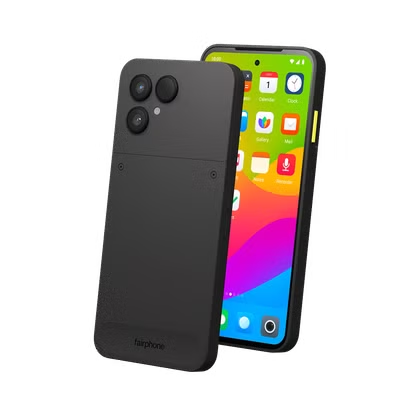
Using open source apps isn’t the sacrifice it once was. While you can install any of these apps on a Google Pixel, I’m using them on a Murena Fairphone 6, an Android phone where not only the apps on top are open source, but so is everything else.

- Brand
-
Murena
- Display
-
6.31 inches
The Murena Fairphone (Gen. 6) is the perfect option to bring together privacy and sustainability. Powered by the /e/OS operating system, the Fairphone (Gen. 6) protects you and your data at all times, while at the same time protecting the planet.
Lawnchair
A Pixel Launcher that lets you remove the search bar
The Pixel Launcher is attractive and polished, but it’s about as customizable as an iPhone. After all, there were years of complaints before Google caved and provided the option to turn off the At-a-Glance widget in the top left corner. You still can’t move it around.
What’s just as intrusive is the Google search bar at the bottom of the screen. I understand that getting people to use Google Search is half the point of Google’s investment in Android, but I haven’t used Google Search in years. The Pixel launcher will not let you swap out the search engine that the widget uses, nor would it let you turn the widget off.
You can install any number of custom launchers to solve this problem, but if you really want the Pixel launcher and aren’t looking to radically reinvent the wheel, then you want Lawnchair. It’s a pun. Get it?
Lawnchair is simply an open-source version of the Pixel Launcher, but with the ability to make whatever changes you want. It otherwise looks and feels the same. Enjoy.
Material Files
A file manager that can access your local network
Files by Google does not look or feel like the file manager that comes on your laptop. That alone is reason enough for some of us to swap it out, but there are other features found in alternative launchers that this one simply can’t do. One core feature is the ability to access files shared over your local network from another computer. To view those, I install Material Files instead.
There’s another advantage of Material Files over Files by Google that has been common to alternative file managers for over a decade—this half-century-old trick that allows you to share files from your phone to any other internet-connected device. You don’t need to pay for cloud storage or depend on any locked-down corporate protocol. You just set up your phone as an FTP server and enter the web address that it provides on your other device. Simple.
Lotus
An MP3 player that isn’t a hidden YouTube feature
Most people stream music, but that approach is not for me. I prefer to purchase MP3s. Technically, I can listen to my MP3 library on a Pixel out of the box by using YouTube Music, but no one thinks of YouTube Music as the ideal local MP3 player—not even Google. The point of the YouTube Music app is to get you to pay for a subscription.
So I downloaded a dedicated music player instead. There are a number of open source options I can recommend. I long used Auxio and recently became a fan of Symphony, but I’m currently using Lotus. It is the most Material 3 Expressive MP3 player I’ve seen yet, and it looks the most like the software I could imagine Google shipping.
Like a growing number of the best open source apps, Lotus isn’t available from the Play Store. You’ll have to download F-Droid for this one.
Aves Gallery
No need to upload your photos to enjoy the best features
Google displays every image that comes out of your camera in Google Photos. This app can function as a local photo gallery, but just like with YouTube Music, Google really doesn’t want you to use the app this way. It will perpetually tell you that photo backup is off and prompt you to turn this feature on. Please give us all your image data, Google begs. Please!
If you want a local gallery app that doesn’t have an ulterior motive yet comes with all the bells and whistles, look no further than Aves Gallery. Not only does this gallery app not track you, use your images for training AI models, or ask you for money, but it retains features that the Google Photos app lacks when you keep your photos offline.
Open source Android apps are better than you might think
I remember when searching F-Droid surfaced open source apps that felt like a step backwards from the ones that Google offered. That is no longer the case. I’d even go so far as to say that the tables have turned, and I prefer looking for apps in F-Droid when I’m in need of something new. There isn’t an app for everything, but much of what’s there is surprisingly good.

