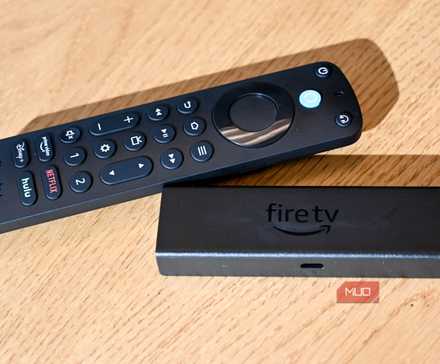
I spent the holidays overseas, with no access to my regular paid subscription services, and to be honest, I didn’t feel like I missed them all that much. Sure, it was nice to come home and catch up on my favorite shows, but it got me thinking about how much time and money I spend on streaming TV and how often I experience “burnout” from having too much content at my fingertips.
I wasn’t prepared to stop streaming TV entirely — that would be unthinkable — but I wanted to reach a happy medium that would allow me to dedicate more time to hobbies and interests and save some cash on the side. The answer lay in my trusty Amazon Fire TV Stick 4K, which I purchased for the bargain price of just $29.99, as it would give me access to a range of high-quality free apps without paying for subscriptions.

Why I Stopped Using My TV’s Built-in Apps and Bought a Streaming Box Instead
Suddenly I don’t feel so frustrated anymore, and I have fewer headaches.
Why I chose the Fire TV Stick
Subscription fatigue and rising costs vs. freedom and simplicity

The Fire TV Stick is simplicity itself. You just have to plug it into a vacant HDMI port and wall outlet (or your TV’s USB port) for power, and away you go. It comes with various preinstalled apps, but the fun lies in customizing it with your own selection.
Despite its size, the device packs impressive features. It supports 4K Ultra HD, HDR, and Dolby Vision, which can instantly improve picture quality on older hardware. The included Alexa Voice Remote makes navigation much easier, letting you search for shows, launch apps, or control playback with simple voice commands.
I also like the interface. Amazon Fire TV features a clean, responsive dashboard with useful suggestions and all its features accessible from the home screen. I used to like my trusty old Chromecast, which was available at a similar price point; however, Amazon is streets ahead as a standalone device that doesn’t rely on mobile connectivity.
Free apps that replace paid services
Ad-supported platforms and open apps cover nearly everything
The Fire TV Stick is the perfect device for streaming free content, thanks to the broad range of platforms available on the Amazon Appstore. As soon as I started exploring free, ad-supported apps like Pluto TV, Tubi, and Freevee, I was astounded by the thousands of movies, TV shows, and even live channels I could access, with much of it available on demand.
For example, Pluto TV mimics the traditional cable experience with live “channels,” while Tubi provides a massive on-demand library. Freevee adds a mix of original content and recognizable titles, and even media players like Plex provide an impressive array of ad-supported entertainment alongside local media listings. Between them, I found plenty to watch, without feeling like I missed out on my paid subscriptions.
I like the fact that platforms like Plex and Pluto TV offer dedicated channels for classic shows like Nash Bridges and Cops, as well as entire genres like sports, thrillers, and true crime. These are perfect for laid-back viewing, while on-demand services allow you to scroll through the day’s listings and start movies from the beginning. Alternatively, Tubi provides a great range of documentaries and recent movies that rival many paid subscription services.
The real-world experience after switching
Performance, usability, and the inevitable drawbacks of free entertainment

Having viewed exclusively free content for the last few weeks, I realized I didn’t miss my old setup nearly as much as I expected. I like how much easier everything feels. Instead of bouncing between devices and remotes, I have a single, consistent interface. The Fire TV Stick 4K runs smoothly, with fast app launches and minimal buffering. Even on a moderate internet connection, streaming remained stable and high-quality.
There are, however, a few limitations. Certain premium exclusives still require paid subscriptions, and the home screen occasionally prioritizes promoted content. But these are minor annoyances compared to the overall simplicity and savings.
The main trade-off is that ads are part of the experience, and you won’t always find the latest blockbuster releases. In this way, it does feel like a step backward. But the variety is impressive enough, and for casual viewing, it more than covers the basics. I also supplement my news, tech, and niche content with YouTube, which keeps me up to speed and makes the whole setup feel less limited.
A cheaper, simpler way to stream — with a few trade-offs
Switching to a budget-friendly streaming setup proved that I don’t need expensive subscriptions or high-end hardware to enjoy quality entertainment. And while it’ll never be a perfect replacement for premium services, the combination of a low-cost device and free apps delivers remarkable value.
For anyone feeling overwhelmed by streaming costs or the complexity of juggling multiple subscriptions, this approach offers a refreshing alternative. I wouldn’t say that “less is more” in this instance, but it doesn’t feel like I’m making too big a compromise for a perfectly satisfying TV experience.

- Brand
-
Amazon
- Operating System
-
Fire OS
- Downloadable Apps
-
Yes
- Resolution
-
4K
- Ports
-
HDMI
- Audio codecs
-
Dolby Atmos Audio