While Apple has recently been forced to offer alternative app stores in the EU, they’ve been around much longer on Android: The more open nature of Google’s mobile operating system means it’s easier to access apps that haven’t been specifically Play Store approved, and the quality and breadth of these apps is better than you might have realized.
Leading the way here is F-Droid, a repository of Android apps released as free and open source software, with an emphasis on security and privacy—both the code and the permissions of the apps are presented transparently, and there aren’t the usual Google tracking and analysis extras on top.
You don’t get the full Play Store security protection with F-Droid, and you are relying on the F-Droid team keeping its operations safe and secure—something it has a strong record in. However, down the years this alternative app store has proved a reliable source of safe and trustworthy apps, including the recommended ones below—just be sure to stick to apps that are well-known and frequently updated.
This is a timely moment to be recommending F-Droid apps, because the database is under threat from Google’s stricter policies on apps from outside the Play Store, coming into force in several months time. It’s going to mean more verification and less privacy for developers, and a more convoluted process for sideloading apps (these will still be allowed, but you’ll have to wait 24 hours for each install).
F-Droid has put up a campaign page you can read through to understand the issues at stake, and you can sign your support to help it battle this “existential threat.” In the meantime, the best way to support F-Droid and its openness is by making use of the platform, and the excellent apps below.
Head to the F-Droid site to get the app store up and running, which then gives you access to the app library, including those here. Once these apps are installed, they’ll appear in the Android app drawer as normal.
Paperize

Credit: Lifehacker
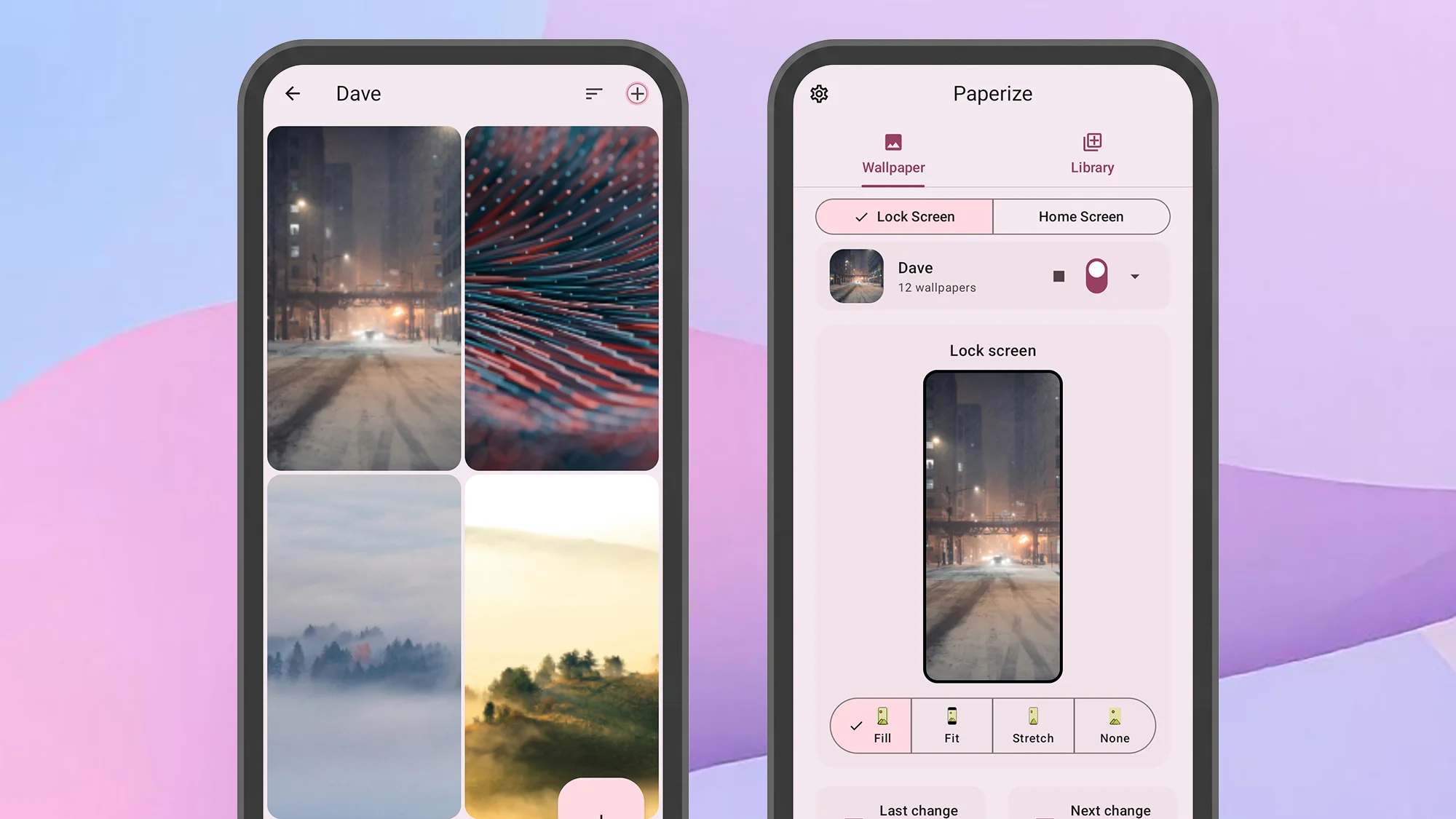
Paperize is a polished, stylish wallpaper changer that lets you switch between your pick of backdrops for the lock screen and the home screen on a schedule. You choose the pictures and the timings, and you get more control than with the default settings inside Android. The app is smart enough to be able to adjust images to fit the dimensions of your device, and there are some handy effect and filter options as well if you need them.
OpenTracks

Credit: Lifehacker
OpenTracks is a fitness tracking app that respects your privacy—you don’t even need to connect it to the web or sign up for an account. You can use it to track runs, hikes, and cycles, and plot them on a map with details like distance covered and average speed.
What you don’t get with this app is full support for wearables and fitness trackers, though you can sync data over Bluetooth from certain heart rate monitors and cycling computers. Your phone is used as the main “tracker” device, so you’ll need to always have it with you.
Breezy Weather

Credit: Lifehacker
There are no shortage of weather apps out there, but Breezy Weather makes a solid claim for being your default. It’s able to pull meteorological data from numerous public sources, and then presents the data in a variety of interesting and engaging ways.
It definitely holds its own against the default weather apps you get with Pixel and Galaxy phones, and there are tons of customization options here (including which weather info gets shown and where), as well as the all-important widgets for your homescreen.
Chrono

Credit: Lifehacker
Every alarm, clock, and timer app is much like another, right? To a certain extent, but Chrono has an elegance and an intuitiveness that not many other apps of its type have. From split times in the stopwatch to time zones in the clock, there’s a lot to explore.
What do you think so far?
Some of the touches I like here are the alarm filters —see active, snoozed, and disabled alarms in a tap—and the presets in the timer section, to quickly launch a meditation or workout (for example). You get full control over the color scheme of the app, too.
HeliBoard

Credit: Lifehacker
F-Droid does keyboards too, and with HeliBoard you have a keyboard that’s fully customizable and flexible and yet which can work fully offline too—so none of your keystrokes or typing patterns are getting beamed back to a data server somewhere.
Among the tweaks you can make to the keyboard are the style and the layout of the keys, and the colors used. You can add toolbars and dictionaries, configure swipes and long presses, and add sounds and vibrations. It’s comprehensive, as well as being private.
Auxio

Credit: Lifehacker
Auxio is a “simple, rational” music player that will take you back to the days before streaming music. It focuses exclusively on local files stored on your own device, which means spotty internet access is no problem, and no one is tracking your musical tastes.
All the basic features you would expect to find are here, and once you’ve imported your music, it’s neatly sorted by its metadata into albums, artists, and genres. There’s a built-in equalizer here, as well as a playlist creator, and a handful of customization controls.
Librera Reader

Credit: Lifehacker
Librera Reader can turn your handset into a decent e-reader—it’ll be of interest to anyone who has reading to do on their phone. The app can open up a whole host of e-book and document formats, from EPUB to PDF, and has a broad range of customizations available.
You get a choice over how you read your documents and e-books—including top-to-bottom infinite scroll, left-to-right book-style scroll, and even auto-scroll—and there’s all the support you would expect for bookmarks, search, and document outlines.
