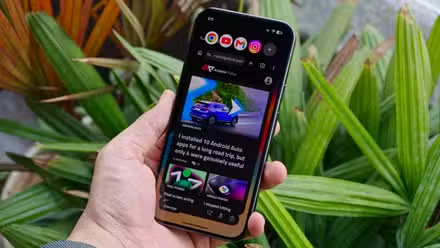
Android 17 is here, and it’s packed with features.
The productivity and multitasking upgrades have made the biggest difference to how I use my Google Pixel phone, but there’s one tiny change that has had an outsized impact.
Removing app names might not sound like much, but it’s a change I can’t go back from.
This is more than a minimalism upgrade; it’s a tweak that I think everyone should make.

Android 17 added a feature so good I can’t stop raving about it
App bubbles changed how I multitask
Hiding app names is a substantial change
It’s more than a win for minimalist fans
I cannot remember the last time I recognized an app by its name.
Developers put a lot of work into making sure their app icons stand out, and while this isn’t great for phone addicts, it makes it easy to tell which app is which.
Hiding app names has not harmed how I use my phone. I install and uninstall more apps than most people, but I’m still perfectly capable of keeping track with app icons.

Importantly, app names cannot be hidden in the app drawer. This remains the alphabetically sorted repository we all know and love.
On the occasion I do lose an app, I can turn to this trusty stash to find what I’m looking for.
But removing app icons isn’t a pointless update. A long-term gripe of mine has been how complicated wallpapers, especially those in black and white, make my home screen a confusing mess.
There was no way to change how the app names looked, so I started using minimalist wallpapers so that my home screen wasn’t plastered with unreadable text.
Now I can hide app names; my phone looks so much cleaner, even with complicated wallpapers.


See the difference? Hiding app names has unlocked the ability to use vastly more wallpapers without turning one’s home screen into a confusing blur, like in the example above.
How to make app names disappear
Pixel phones only for now
All you need to send app names into the great beyond is a Pixel phone running Android 17:
- Tap and hold on your home screen.
- Tap Wallpaper & style from the pop-up window.
- Scroll down and tap Icons.
- Tap Names.
- Turn off the Show app names toggle.
-
Tap Apply in the upper-right corner of your screen.
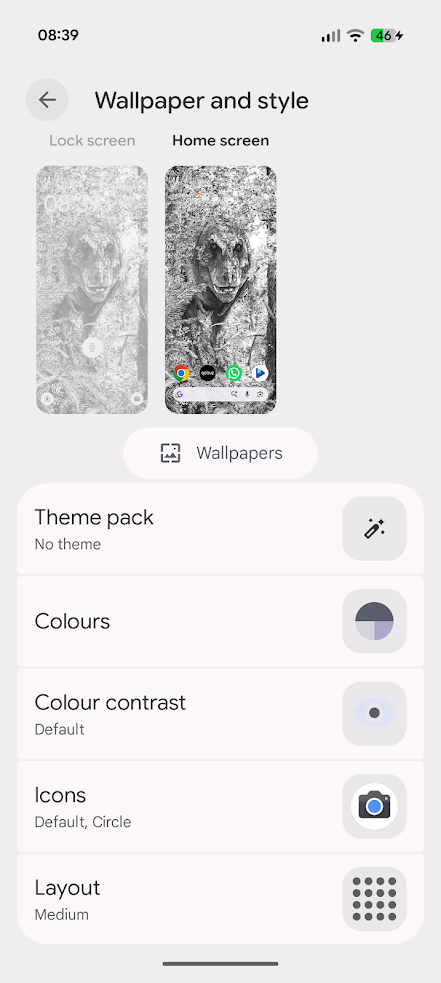
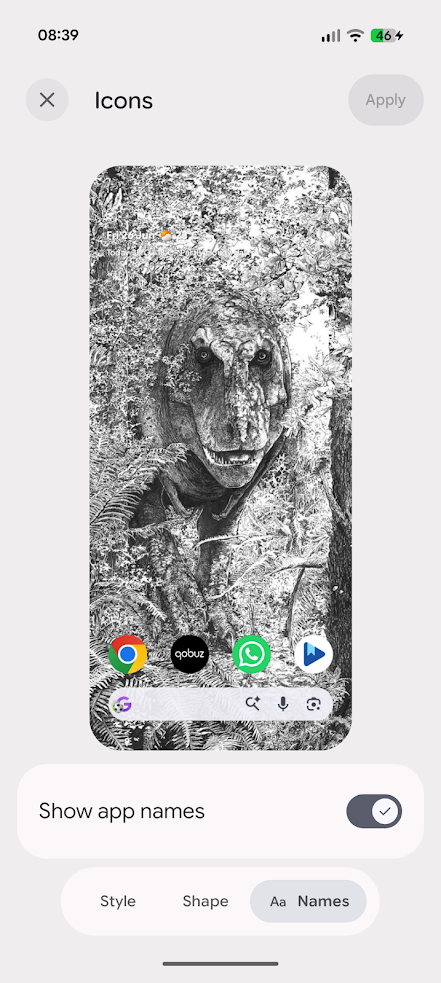


This toggle will remove app names from your home screen, but not from your app drawer.
When app names are necessary
Recent wallpaper features don’t play well together
Monocolor app theming has been around since 2025, and Google expanded its app theming support with a variety of AI-generated themes.
These themes are a mixed bag aesthetically, but they become downright unhelpful when you remove app names.
Hiding app names isn’t a problem because each app is trying to stand out from the others. But when we apply a single theme to them all, a major identifier is taken away.
Most apps can still be identified by their shape, but it becomes a lot harder. Here’s the same home screen as before, but with themed icons enabled.


HelloHabit and Structured would be indistinguishable if not for the inverse scheme. Gmail and Musixmatch are similarly confusing at a glance.
It’s not quite as bad with some of the AI-generated themes that keep color, but the same styling keeps things confusing.
However, if you like a home screen with very few apps that you rarely (if ever) move around, this combo might be ideal.
Android 17 is packed with upgrades that improve the user experience
It’s more relevant than you think
Android 17 was shaping up to be the driest update yet, but it turned out that all the boring productivity and multitasking upgrades were actually useful for everyone, not just power users.
Firstly, split-screen suddenly became useful again for apps. The 90:10 ratio split makes it easy to jump back and forth between apps on the same screen without hiding too much away.

Secondly, app bubbles are incredible. Best experienced on tablets and foldables, they are nevertheless powerful on standard Android phones.
I use them to store all my productivity and organization apps, so I can plan my day without constantly opening the app carousel.
There are also numerous smaller upgrades, such as allowing third-party apps to access the most powerful features of your phone’s camera.
Assistant volume is now separate from media volume, and you can increase your contacts’ privacy by only allowing apps access to those you permit.
Android 17 dramatically improves the OS’s functionality
The ability to remove app names is just the cherry on top of a fantastic OS improvement.
There’s nothing sexy in Android 17, but it makes noticeable upgrades to the parts of your Android phone you use the most.
Are these features substantial enough to justify Android’s annual release cycle? Debatable. But I’m not going to turn down some of the best upgrades I’ve used in years.