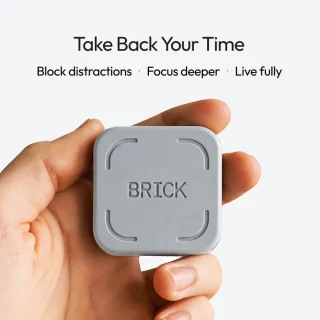
Nearly everyone on team NBC Select thinks they would benefit from less screen time. There are plenty of productivity apps and screen time features that aim to help you focus and reduce distractions, but most of them are easy to override. Perhaps that’s why The Brick caught our attention. It’s both a physical puck and a digital app that “Bricks” your phone, removing access to some (or all) of your apps until you disable it.
But does it really work? And is it better than just using your phone’s screentime features to limit app use? Five NBC Select staffers put The Brick to the test for two weeks. Read their thoughts below.
Want more from NBC Select? Sign up for our newsletter, The Selection, and shop smarter.
What is the Brick?

The Brick is an app and physical puck that blocks apps on your phone. The differentiator is that you can only unBrick your phone by tapping it to the physical Brick. If you brick your phone, then leave the house without the puck, you cannot unBrick remotely. This is much stricter than most apps, which you can typically turn off from inside the app.
(You do have five emergency unBricks you can use through the app, but they are meant for emergencies — you have to email Brick customer support to refresh them once they’re gone.)
You can use one Brick with multiple phones, so a whole household can share the same physical Brick. One Brick costs $59, and there are no subscription fees.
How does the Brick work?
During setup, you can set the Brick to block all apps, block specific apps or select apps to allow (and block everything else). Afterward, a timer starts to show how long your device has been Bricked.
You can set up to 10 modes or schedules to help automate the process — these will Brick your phone automatically at certain times of day (or certain days). When you set up a mode, you can again select which apps to block or keep available.

Why were you interested in trying out Brick?
One of my biggest 2026 resolutions is to spend less time on my phone, especially scrolling mindlessly through social media. I already invested in a screen-limiting app (Opal, which has a yearly subscription fee), so I wanted to try the Brick to see how it compares (especially after seeing so much hype on social media about it).
Where did you put the physical Brick?
I needed to put the physical Brick as far away from me as possible because otherwise it’s too easy to unBrick my phone. I stick the Brick to my fridge at night to avoid scrolling before bed, and zip it up in my work bag when I need to focus at the office. It works best for me when I can’t physically see the Brick.
Did you select specific apps to Brick or Brick everything?
During work hours, I limited specific apps, including TikTok, Instagram, Youtube and Pinterest. These are the apps I’m usually scrolling on the most during the day, so locking them kept me more focused. For bedtime, I Bricked everything. That’s because I tend to wake up in the middle of the night and always find something to scroll through, even when certain apps are locked.
What was the longest amount of time your phone was Bricked?
The longest amount of time my phone was Bricked was eight hours during the workday. That’s probably one of the longest times I’ve ever gone without social media (sadly).
Did you use more advanced Brick features like schedules?
I used schedules often; I have one for work and another for bedtime. Brick automatically locking my apps at a certain hour kept me on track with my goals. For example, I know that once my phone Bricks at 10pm, it’s officially time for bed.
How did using Brick make you feel?
I loved it. It made meeting certain goals (like going to bed earlier, getting more work done and focusing on my journaling) so much easier. I felt like I wasn’t constantly reaching for my phone at random points of the day, and I also wasn’t mindlessly using a locked app when I got bored. Setup was also extremely easy, which I appreciate as someone who isn’t very tech-savvy.
Were there any pain points using Brick? Things you wish were different?
I didn’t love the timer on the screen. It made me anxious to physically see how long (or short) of a time I’ve used the Brick. The more time that goes by, the more I think about how much I’m missing by not scrolling.
Brick’s brand mission states: “Life is better when our phones help us do more of what matters, instead of constantly distracting us with things that don’t.” Did Brick deliver on this?
Yes, it certainly did. Having the option to disable a select number of apps or your entire app library is huge; one lets me avoid looking at my phone before bed or at work, while the other prevents me from mindlessly opening a doom-scrolling app. The latter lets me use my phone for important searches or texts without needing to unBrick the whole thing.
Why were you interested in trying out Brick?
Sometimes when I’m using my phone, it feels less like a conscious decision and more like an automatic instinct. I want to break away from my phone taking up so much of my time and attention. Although I’ve used apps to help me focus and have actively tried to cut down my screen time, I was interested in the Brick because I like the idea of having a physical reminder to get off the phone, especially something that isn’t purely digital (which I think can sometimes feed into the problem).
When did you use Brick most?
I usually use the Brick in the evenings when I like to relax. However, after work I’d often find myself sitting on my phone for an hour or more, and then not getting to the tasks or activities I’d planned because of it. This is where the Brick was most useful to me: At work, I can better focus on things because there are clear deadlines and stakes, but with my own time, it’s harder for me to activate that same discipline.
Where did you put the physical Brick?
I’d put the Brick somewhere nearby, usually on a table or on the counter while cooking, and I’d keep my phone there as well. I thought about putting them in a separate room, but it wasn’t until I kept them nearby that I realized how often I unconsciously reach for my phone to check my messages or scroll my timelines.
What was the longest amount of time your phone was Bricked?
The longest amount of time I Bricked my phone was for three hours and 13 minutes while cooking, and it was glorious. Although I didn’t use any of the fancier features, I Bricked every social and messaging app on my phone, along with workspace and productivity apps. For three hours I did nothing but prep and cook dinner with “The Sopranos” playing in the background, and it felt great to not pause for texting or notifications and just focus on what was in front of me.
Caitlin Cusack, associate social media editor

Why were you interested in trying out Brick?
I wanted to test out the Brick because my screen time has been historically high recently. It’s been below freezing for weeks in New York, so I’ve been spending most of my time inside, usually scrolling on my phone. I also joined a book club this month, and I found that my phone was slowing my book progress down. I have a habit of picking up my phone to give myself a quick break, but it’s super easy to get sucked into TikToks or Instagram stories, then realize an hour has gone by.
When did you use Brick most?
I mostly use the Brick during work hours and while reading. I normally work and read in my bedroom, so I put the Brick on my fridge in the kitchen, which is at the opposite end of my apartment. It’s not that far of a walk, but it means that I have to put in a little extra effort to unBrick my phone.
Did you select specific apps to Brick or Brick everything?
I selected specific apps, and made sure that all of my social media apps (like Instagram, TikTok and Youtube) were blocked, along with any iPhone games.
What was the longest amount of time your phone was Bricked?
The longest amount of time my phone was Bricked was about two hours. It made me realize that I have a muscle memory when it comes to picking up my phone and clicking on certain apps. Multiple times, I found myself unlocking my phone and trying to use different apps, then remembering I had them Bricked. As time went on, I became more conscious of the fact that my favorite apps were blocked, and I started reaching for my phone less and less.
Nikki Brown, senior editor

Why were you interested in trying out Brick?
I’ve had a mild curiosity about this device for a while. The idea of using more technology to address a technology distraction gives me pause but I figured, why not give it a go? My phone setup has been pretty bare bones for years: I don’t have notifications on for anything in my phone outside of texts and calls, and the only social media-like apps I have are Pinterest, Reddit and YouTube. I save a lot of my internet time for my laptop, where there are already enough distractions, so I have Do Not Disturb scheduled for the workday and when I am winding down/going to bed. Could Brick actually take my efforts to be distraction-free to the next level? My only real hope going into this was that it would curb the physical action of grabbing my phone, looking at it briefly just because and putting it back down, which sucks up so much time despite being completely pointless.
When did you use Brick most?
My favorite time to use Brick is between 9 AM and lunchtime when I am at the office. This is when I am at peak energy and want to do my deepest work.
Did you select specific apps to Brick or Brick everything?
I selected specific apps to Brick. I didn’t feel the need to Brick the entire thing because again, I already have well-established guardrails in place that have curbed my phone use.
How did using Brick make you feel?
As far as curbing that annoying habit I mentioned earlier, it did. Every time I went to grab my phone, I was greeted by the image of the Brick next to the amount of time I had it Bricked so far. I think Ashley worded this great: it almost felt like my phone was shaming me every time I fell into that bad habit. It made me so much more aware of how much I do it.
Brick’s brand mission states: “Life is better when our phones help us do more of what matters, instead of constantly distracting us with things that don’t.” Did Brick deliver on this?
I don’t know if Brick delivers on its mission statement. Most of what I do on my phone I can also do on my laptop, so is it solving distraction or just shifting it to another device? I’m not sure.
Why were you interested in trying out Brick?
One of my goals for this year was to cut down on my social media consumption. I deleted all the apps from my phone at the beginning of the year, but I quickly felt out of the loop with my friends (and they kept getting annoyed that they were sending me messages and I couldn’t see them). That’s why I thought using the Brick would be a better approach.
When did you use Brick most?
I set up three schedules: one during work, one a couple hours before bed and one for weekend mornings. I only Bricked my social media apps because I didn’t feel like any other apps were taking up as much of my time.
How did using Brick make you feel?
It limited my time mindlessly scrolling on apps and got me using them with intention instead. I do think there are benefits to using social media apps: I get a lot of recipes and book recommendations through them, and they help me stay connected to my friends and family. Everytime I reached for my phone while it was Bricked, it made me reflect on why I was reaching for it. I became more mindful of what void I was trying to fill and how I could redirect that to something more productive (this led to a lot more journaling).
Brick versus other screen time apps
Brick vs Opal
Opal is a screen time app that lets you block apps, games and websites of your choice, with features similar to Brick, including schedules, focus modes and blocklist and whitelist apps. There is a free version of the app, but the pro version, with more advanced features, costs $99 a year (or $8.29 per month), much pricier than Brick.
“I’m an avid Opal user, but I like how strict Brick is by comparison,” says Godio. “I can’t bypass the Brick as easily as Opal, which I can end quickly by going to the app and selecting ‘stop session.’ Plus, I can leave my house without the physical Brick and know that I won’t be able to use blocked apps at all until I get home.”
Brick vs Apple Screen Time
Apple Screen Time is an app built into every iPhone that allows you to set focus modes that block apps, limit notifications and set time limits for apps of your choosing. “I think Brick is more effective than Screen Time,” says Rodriguez. “Having to physically tap the Brick to unBrick my phone is a much harder barrier than simply clicking the ‘ignore limit for today’ button that shows up using Screen Time.”
Brick vs Focus Friend
Focus Friend is very different from Brick and other screen time apps. It’s a gamified focus timer app that uses positive reinforcement, rewards and a bit of guilt to encourage you to focus. When you start a Focus, your Focus Friend, a cute animated bean, will start knitting. You can still use other apps on your phone, but doing so will end the Focus early, destroying your Focus Friend’s knit, making them very sad. If they complete a knit (AKA you complete your Focus session), you can earn cute items to decorate Focus Friend’s room. It’s a free, cozy and less intense alternative to Brick and Opal, but it may not be very effective, depending on your needs.
Why trust NBC Select?
I’m a reporter at NBC Select who covers technology, fitness and deals including stories on smartwatches, running shoes, streaming devices and more. I’ve written about apps and productivity for years. For this story, I recruited NBC Select staffers to test the Brick for two weeks, and interviewed each of them about their experience using the product.
Catch up on NBC Select’s in-depth coverage of tech and tools, wellness and more, and follow us on Facebook, Instagram, Twitter and TikTok to stay up to date.