I barely took any notice of Google Lens for years; it was just another icon cluttering my search bar. Sure, I once used it to translate a sign from Russian in a Vietnamese supermarket (with results that left me none the wiser), but it seemed little more than a gimmick.
That is, until I started using it in more day-to-day situations and quickly realized it’s a powerful tool that can replace several single-purpose apps I regularly use.
While traveling, it replaced my translation app
Reading signs in India made it an essential companion

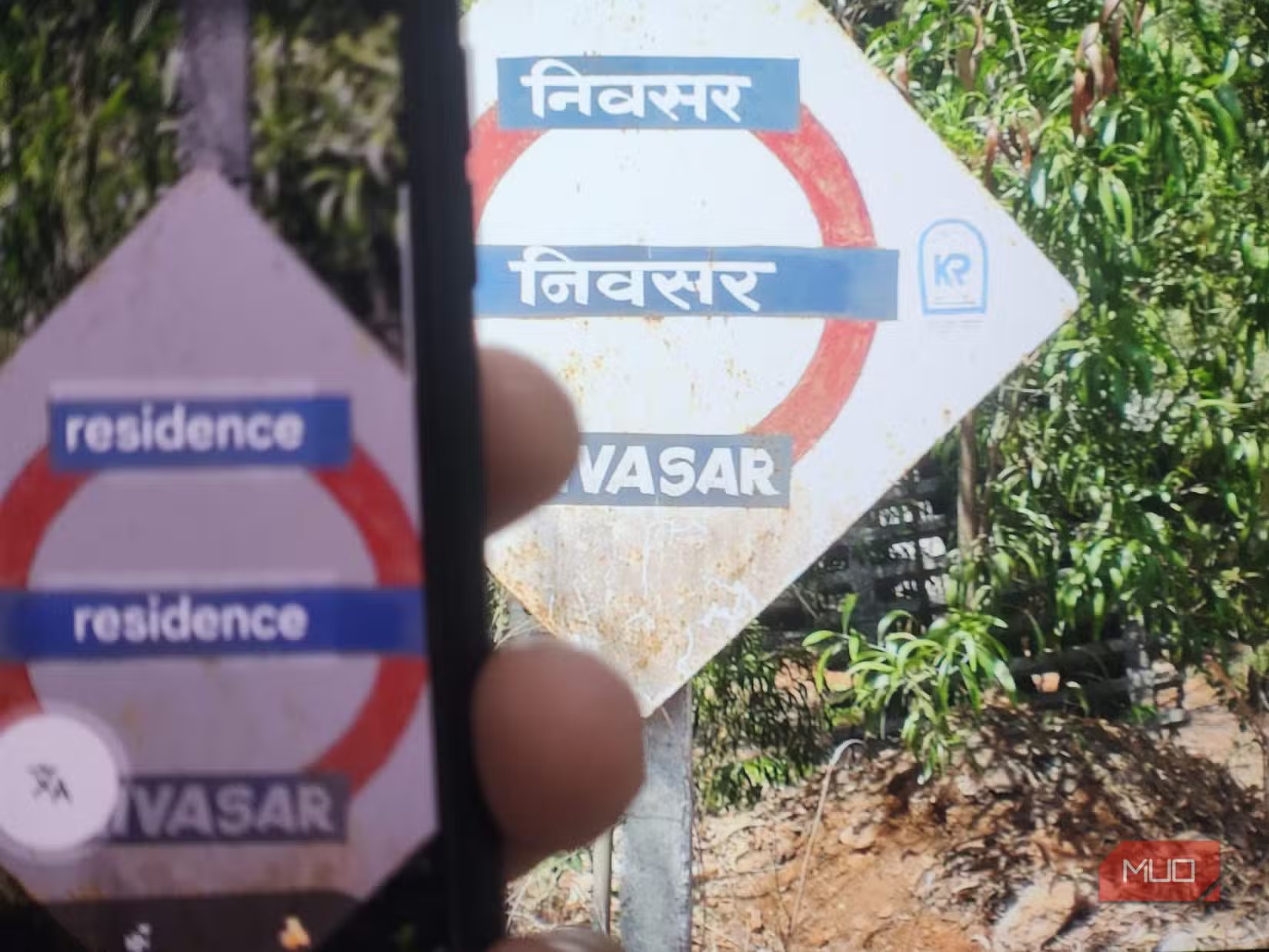
During my recent motorcycle trip in Northern India, especially in rural areas, I found myself constantly pointing my phone at road signs, restaurant menus, public notices, and shopfronts written in Hindi. Normally, I’d have opened a translation app, but instead, I opened Google Lens.
The live translation feature overlays English directly onto the original text, making it feel like you’re reading the sign in your own language. It was much faster than using Google Translate and meant I could understand information almost instantly while traveling in unfamiliar places.
It wasn’t perfect every time, especially with heavily stylized fonts or faded signs, but it was accurate enough that I rarely felt the need to use anything else. Prior to my trip, I also used it to translate “Asterix” books from French whenever I encountered text I didn’t understand, so it’s also a valuable learning tool.
While Google Translate still has many useful features, for quick translations in real-life situations, Google Lens has made my dedicated translation app almost redundant.
It replaces identification apps
Lens now identifies almost everything I point my camera at
I assumed Google Lens could identify things like plants and wildlife, but it turns out that’s only scratching the surface.
Over the past month, I’ve used it to identify birds, dog breeds, landmarks, artwork, obscure vehicles, household objects, and random gadgets I’d never seen before. During my travels, it became almost second nature to point my phone at an interesting building or monument to learn more about its history without needing a guidebook or seeking local knowledge.
The biggest advantage here is that, while Google Lens is not necessarily the best solution for every category of identification, it is an all-encompassing solution that combines everything into one.
It replaced my QR code scanner
I no longer keep a dedicated scanner on my phone

There was a time when installing a QR code scanner was almost essential, but even with scanner functionality built into phone cameras, Google Lens improves upon this feature.
Whether I’m scanning a restaurant menu, opening a travel ticket, connecting to Wi-Fi, or checking a QR code on product packaging, Lens recognizes it instantly. It also reads traditional barcodes, making it easy to compare prices or search for products online while browsing in physical stores.
I quickly started taking this feature for granted, as it’s now my go-to app for all QR code requirements. Removing a dedicated QR scanner didn’t save much storage, but it did remove unnecessary clutter from my phone, and Lens is easily accessible right from my search bar.
It replaced my text scanner
Copying printed text now takes seconds

It may not be the most useful Google Lens feature, but I often need text from receipts, instruction manuals, business cards, or handwritten notes, and for this I have always used a dedicated OCR (optical character recognition) app. Now I simply point my camera at the page.
Lens quickly and accurately extracts the text so I can copy it into an email, search for it online, or paste it into a document. I’ve found this especially useful for serial numbers, Wi-Fi passwords, long tracking numbers, notes on whiteboards, and other things that I’d have difficulty either copying or remembering.
I still prefer the dedicated document scanner in Google Drive for creating clean PDFs for archiving, etcetera, but for quickly grabbing text, Google Lens is both faster and more convenient.
Finding products is easier, especially if you don’t know their name
It’s not always convenient or appropriate to stop and ask about items you see and want, so one of my favorite uses for Google Lens is identifying products I happen to spot while I’m out and about.
I’ve pointed it at lamps in cafés, furniture in hotels, trainers worn by strangers, kitchen gadgets, and motorcycles in showroom windows, simply because I wanted to know what they were or learn more about them. Lens usually identifies the exact product (or a very similar one) immediately and provides links to similar items, retailers, prices, and reviews.
It’s particularly useful because you don’t need to know the brand or even the product’s name. If you can see it, there’s a good chance Google Lens can help you find it online.
One app quietly replaced five others
Google Lens went from something I ignored to becoming one of those apps I use almost subconsciously. Whether I’m translating text abroad, identifying something unfamiliar, scanning a QR code, copying printed text, or tracking down a product I’ve spotted, it’s usually the first tool I reach for. While it’s true that some dedicated apps still offer more advanced features in their respective categories, for everyday tasks, Google Lens is like a digital Swiss Army knife that does everything you need, all within one compact tool.

