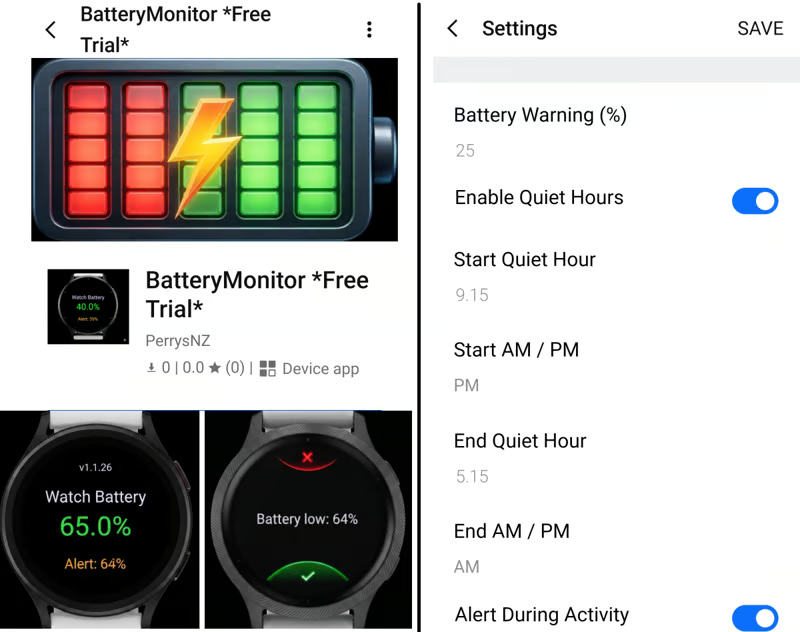
Perry S’s wife kept running her Venu 3S flat. The charge would be gone just as she wanted to record a session, or she would be a long way from a charger with nothing to do about it. Perry wrote her an app that monitors the battery and warns her before it runs low, then posted it to the Connect IQ showcase forum. Four watch faces followed, all doing the same job differently.
Who is Perry
Perry S is an independent Garmin Connect IQ developer based in Cambridge, New Zealand, writing in Monkey C and VS Code in his spare time. He has five published apps: one battery alert widget and four watch faces. All five address a single problem: knowing the state of the battery before it becomes a problem. He tests on his own Venu 3, his wife’s Venu 3S, and the Connect IQ simulator.
Battery Monitor and Alert
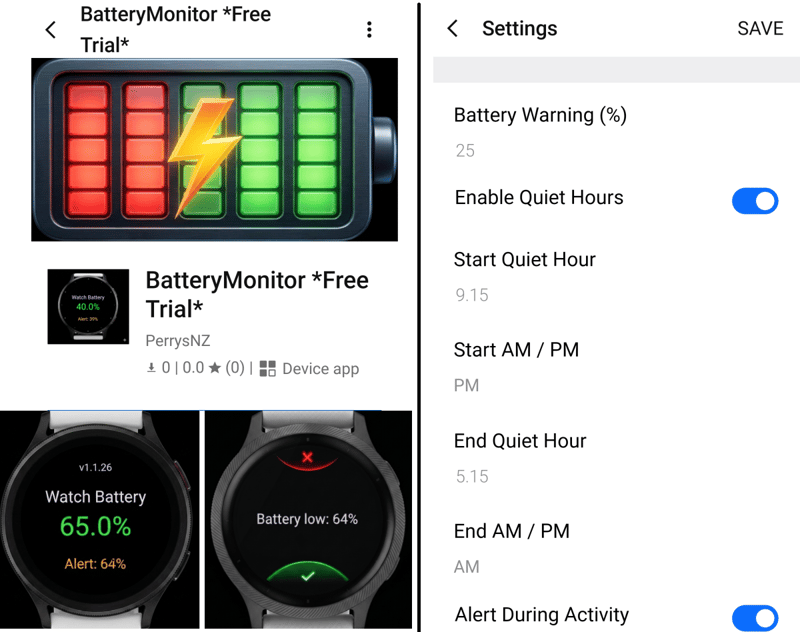
Owners often do not want to give up their existing watch face, so the alert lives in a widget instead. It sits in the background and does one thing. Set the threshold once in the Garmin Connect IQ phone app, and an alert appears on screen when the battery reaches that level. Dismiss it, and it leaves you alone for an hour before checking again. Recharge above the threshold, and the alerts stop until the charge falls below it again.
Quiet-time windows suppress the alert during sleep or during an activity. Set the threshold at 20 per cent, and the warning will not interrupt a long run at the point where the battery crosses it. It arrives once the run has finished.
Nothing about the existing watch face changes. Setup runs through the phone, after which the widget runs on the watch alone, with the phone left at home.
A 36-hour free trial applies, then a one-off $1.25 through KiezelPay. There is no subscription.
Battery Monitor and Alert on the Connect IQ store
WaterBatteryWatchFace Analog
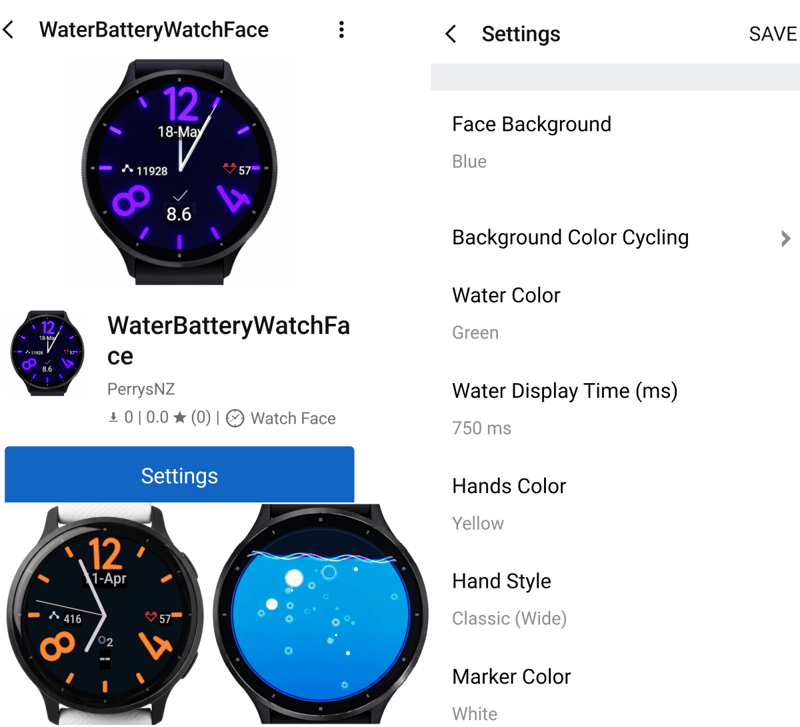
Charge appears as a level of water briefly filling the face each time the screen wakes. High water means plenty left. Low water means finding a charger. The water has five colour options, and the display duration on wake is adjustable.
Four complications sit on the face. Each has its own independent cycle setting, and each can display any of eleven available statistics. The numerals and tick marks offer six colour choices, either fixed or cycling automatically on a schedule ranging from 2 minutes to 24 hours. Perry has his own set to change every half hour.
Recent updates fixed display problems on the Venu 2S, Venu Sq 2 Music, Forerunner 265S, epix and fenix 7 variants, as well as a crash on the Vivoactive 5.
A one-day free trial applies, then a one-off $1.50 through KiezelPay.
WaterBatteryWatchFace Analogue on the Connect IQ store
WaterBatteryWatchFace Digital
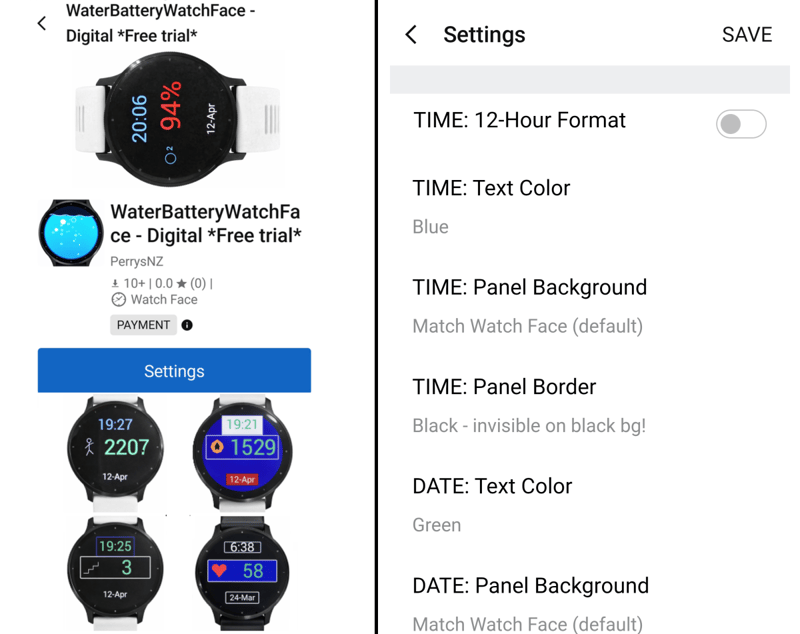
The digital sibling retains the water mechanic and prioritises readability. While the analogue face leans on colour variety, this one is built to be legible, including for people with poor vision.
The layout runs in three panels. The top panel shows digital time in 12-hour or 24-hour format, the bottom panel shows the day and date, and the middle panel is a large Cycle panel. Choose any or all of eleven available statistics, each paired with its own icon, and the panel rotates through them at a speed you set, from every two seconds up to every ten. Background, panel, and text colours are configurable, along with panel frames, producing high-contrast combinations rather than merely decorative ones.
Water colour carries the same five options, with the wake display running from half a second up to three seconds.
A one-day free trial applies, then a one-off $1.50 through KiezelPay.
WaterBatteryWatchFace Digital on the Connect IQ store
PizzaBatteryWatchFace, analogue and digital
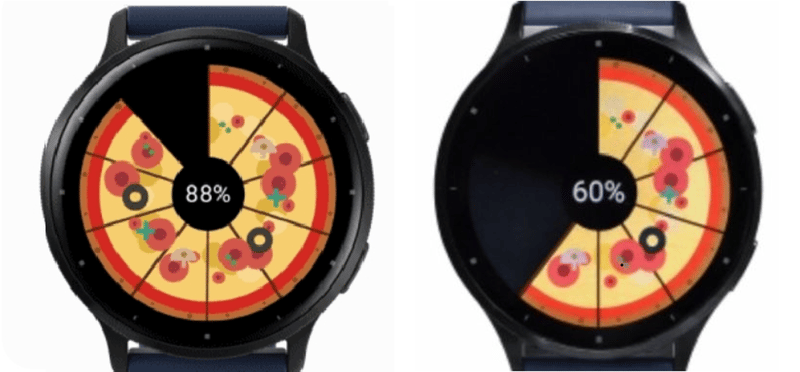
The Pizza faces swap the water for a pizza that fills as the charge rises. Both variants mirror their water counterparts. The analogue version offers the same complications and colour-cycling options; the digital version retains the three-panel layout for legibility. The difference is cosmetic.
A one-day free trial applies to either version, then a one-off $1.50 through KiezelPay.
PizzaBatteryWatchFace Analogue on the Connect IQ store
PizzaBatteryWatchFace Digital on the Connect IQ store
Why simple, why Garmin
Perry started on Fitbit, where he built an earlier watch face called SimpleKiwi. He bought Garmin devices for himself and his wife, the ecosystem stuck, and all five apps have been built there since.
The narrow scope is deliberate. Each app solves battery awareness and goes no further. Configuration happens in the Garmin Connect IQ phone app. Execution happens on the watch, independently of the phone, which is the whole point for anyone who leaves it behind. What none of them can do is put charge back in, so the battery bank still has a job.
Beyond Garmin, Perry has Android apps in development. None has been released yet.
Authored with PerryS, edited by the5krunner
Quick answers
Do these apps work on my Garmin watch?
Perry states that all five have been tuned across a wide range of Garmin devices, with recent fixes for the Venu 2S, Venu Sq 2 Music, Forerunner 265S, epix and fenix 7 variants, and a crash fix for the Vivoactive 5. Compatibility varies by app. Check the Compatible Devices tab on each Connect IQ store listing before installing.
Are the apps free?
Each carries a free trial before payment. Battery Monitor and Alert runs for 36 hours, each of the four watch faces for one day. After that, each is a one-off purchase through KiezelPay, which does not sell subscriptions: $1.25 for Battery Monitor and Alert, $1.50 for each watch face.
Do I need my phone with me for these to work?
No. The Garmin Connect IQ phone app installs and configures each one, but all five then run on the watch itself. Leave the phone at home, and they behave the same.
Last Updated on 12 July 2026 by the5krunner
My favourite kit and nutrition
- Injinji – Runners protect your toes. Avoid discomfort and minor injury. Run more. Run faster. I use them.
- Garmin 90-degree charging adapter — The small adapter that keeps your charging cables tidy. Essential for race day. I use one.
- Garmin charging puck — the fastest and most reliable way to top up your Garmin before a session. I use one.
- Ravemen FR300 — Front light that mounts directly under your Garmin or Wahoo head unit. Keeps your bars clean and your beam pointed where it matters. I use one.
- Body Glide – The blue anti-chafe stick that all swimmers and many runners use. I use it.
- Maurten — The race nutrition trusted by elite athletes. Gels and drink mixes engineered to be easy on the stomach. I use them.
- Garmin Varia RTL515 — A radar rear light that alerts you to vehicles approaching from behind. Pairs with your Edge or Garmin watch. I use this model.
- Favero Assioma Pro RS2 — The power-meter pedals most serious cyclists choose. Accurate, easy to move between bikes. I use this model.
- Garmin Forerunner 970 — A serious choice for a pro-grade triathlon watch. I use this.
- Polar H10 — My daily driver for accurate, waking HRV readings.
- Wahoo ELEMNT Roam 3 — The bike computer that has the feature Garmin lacks: usability. I use mine on most rides.
Reader-Powered Content

This content is not sponsored. It’s mostly me behind the labour of love, which is this site, and I appreciate everyone who supports it.
Support the site: Follow (free, fewer ads) · Subscribe (paid, ad-free) · Buy Me A Coffee ❤️
All articles are written by real people, fact-checked, and verified for originality. See the Editorial Policy. FTC: Affiliate Disclosure — some links pay commission. As an Amazon Associate, I earn from qualifying purchases.

tfk is the founder and author of the5krunner, an independent endurance sports technology publication. With 20 years of hands-on testing of GPS watches and wearables, and competing in triathlons at an international age-group level, tfk provides in-depth expert analysis of fitness technology for serious athletes and endurance sport competitors. ID