Summary created by Smart Answers AI
In summary:
- Tech Advisor reports that Android 17 introduces significant security upgrades including enhanced Live Threat Detection with on-device AI and biometric authentication for lost device protection.
- Google’s new anti-spoofing feature automatically terminates fraudulent banking calls, though currently only Revolut, Itaú, and Nubank support this protection mechanism.
- Additional improvements include granular contact sharing controls, location access transparency, USB Protection for Pixel devices, and OS verification features rolling out to Android 11+ devices.
At its Android Show: I/O Edition, Google didn’t just unveil Googlebooks and Gemini Intelligence, along with a host of new features for creators. It also introduced new security features for Android. For many users, this is likely to be the most important development.
Protection against fraudulent calls from supposed bank employees
Banking scams are widespread. Fraudsters call and pretend to be employees of the recipient’s bank. They try to trick their victims into transferring money or revealing account details. To do this, the fraudsters use spoofing to hide their real phone number and instead make the victim believe that the call is actually from the bank.
Google is therefore introducing a new “phone call spoofing protection feature” in collaboration with banking institutions. “It protects users by automatically ending calls from spoofed numbers that pretend to be participating financial apps,” as Google explains. However, this only works if you have installed the app of a participating bank and logged in. In this case, Android discreetly checks incoming calls in the background. The process is as follows:
- When you receive a call that appears to be from your bank or financial institution, Android asks the app for confirmation to check whether the call is actually coming from it.
- If the app confirms that no call is being made, the system ends the call.
- Your bank or financial institution can also mark certain numbers as ‘receive-only’, meaning these numbers are never used to call customers. Incoming calls from these numbers are terminated immediately.
The good news: Google has already started rolling out this feature to devices running Android 11 and above. The bad news: currently, only Revolut, Itaú and Nubank support this protection mechanism.
Improved real-time threat detection (Live Threat Detection)
Live Threat Detection uses on-device AI to analyse app behaviour and alerts you if an app is acting suspiciously. According to Google, the company is stepping up its efforts to ensure this mechanism detects even more problematic apps.
Chris Martin / Foundry
Firstly, Google is introducing new warnings for suspicious behaviour that could be potentially harmful. These include SMS forwarding, where an app forwards a message to another number, and accessibility overlay, where an app uses accessibility permissions to continuously display imperceptible content on the screen that could be used to trick you into taking an unintended action.
Google also plans to warn users about apps that, for example, change or hide their icon and then launch in the background, or misuse accessibility permissions. This dynamic signal monitoring will be enabled on Android 17 devices and is set to be rolled out to unspecified selected devices in the second half of the year.
Better download protection for Chrome on Android
For Chrome on Android, Google is improving app security with an additional layer of protection for downloads. If you have ‘Safe Browsing’ enabled and want to download an app, Google checks the APK file for known malware and prevents the download before you launch it.
Better protection against theft
Google is expanding the “Mark as lost” feature in Find Hub in Android 17 to include the option to lock a smartphone using biometric authentication in addition to the usual device password or PIN. This means that thieves who may have discovered your password or PIN cannot disable device tracking or regain access to your smartphone if you mark it as lost.
Activating “Mark as lost” also triggers additional protective measures such as hiding the quick settings and disabling new Wi-Fi and Bluetooth connections, as Google explains.
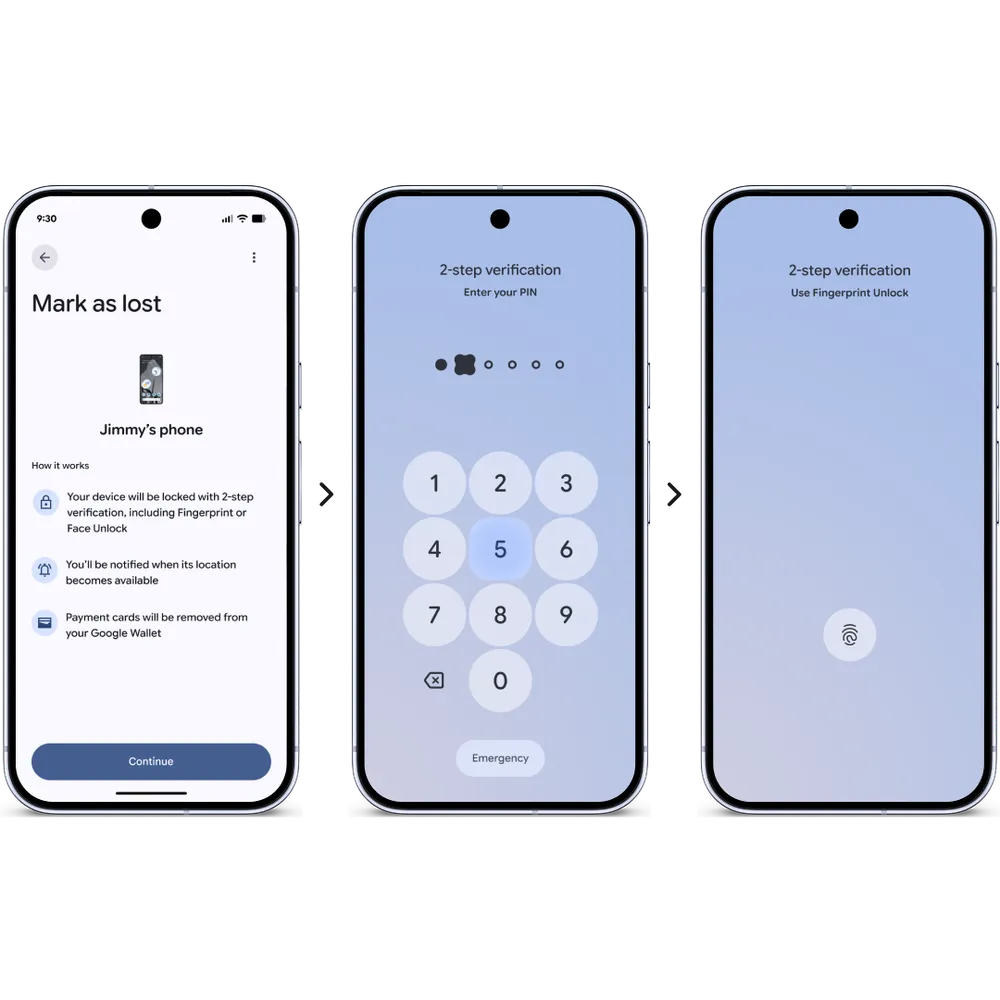
Google is rolling out the theft protection feature, which is enabled by default, worldwide. These features are therefore enabled by default on all new Android 17 devices, as well as on devices that have just been reset or updated to Android 17. Once these features are enabled, functions such as “Remote Lock” and “Theft Detection Lock” are automatically activated, providing immediate protection should your device be lost or stolen.
With Android 17, Google aims to make it harder for thieves to access your data. On supported devices, it significantly reduces the number of attempts to guess the PIN or password. It also increases the waiting time between failed attempts. This deters attackers who try to gain access to your smartphone by rapidly trying different combinations. Google also says it has made some improvements to how the lock screen displays information after failed attempts.
To make it easier to recover devices, a device’s IMEI can now be accessed via the lock screen on devices running Android 12 or higher. Law enforcement agencies, device manufacturers or mobile network operators can use this unique device identifier to quickly verify ownership of the device and return it to you. This feature can be disabled at any time in the device settings.
Enhanced privacy protection
To give users more control over location sharing, Google is introducing a new location button in Android 17 that allows users to temporarily share their precise location for specific tasks while a particular app is open. This is ideal for quick tasks, such as finding a nearby café, as it grants access for that specific moment without requiring permanent permissions or repeated prompts.
Google also aims to improve transparency regarding location access by making it clearer when an app is accessing your location. Similar to the notifications for the camera and microphone, this updated location notification appears at the top of your screen as soon as your location is accessed.
You can tap the indicator to see exactly which apps have recently accessed your location and manage these permissions immediately via the ‘Recent app usage’ dialogue box.
A new contact selection feature is designed to provide greater privacy and control when you grant other apps access to your contacts. In the past, apps often had to request comprehensive access to your entire address book just to connect you with a single friend. Now, app developers have a new, targeted way to request access to specific contacts only.
Apps that request access to contacts can also specify which fields they need, and access to contacts is only temporary to ensure you grant only limited access. Many apps are encouraged to use the location button and contact selection to comply with Google Play policies.
Further improvements
As part of “Advanced Protection”, “USB Protection” is now available on all Pixel devices running Android version 16 and above, and will soon be rolled out to other Android devices. “Intrusion Logging” is currently being rolled out to all devices with the 16 December Android update and newer versions.
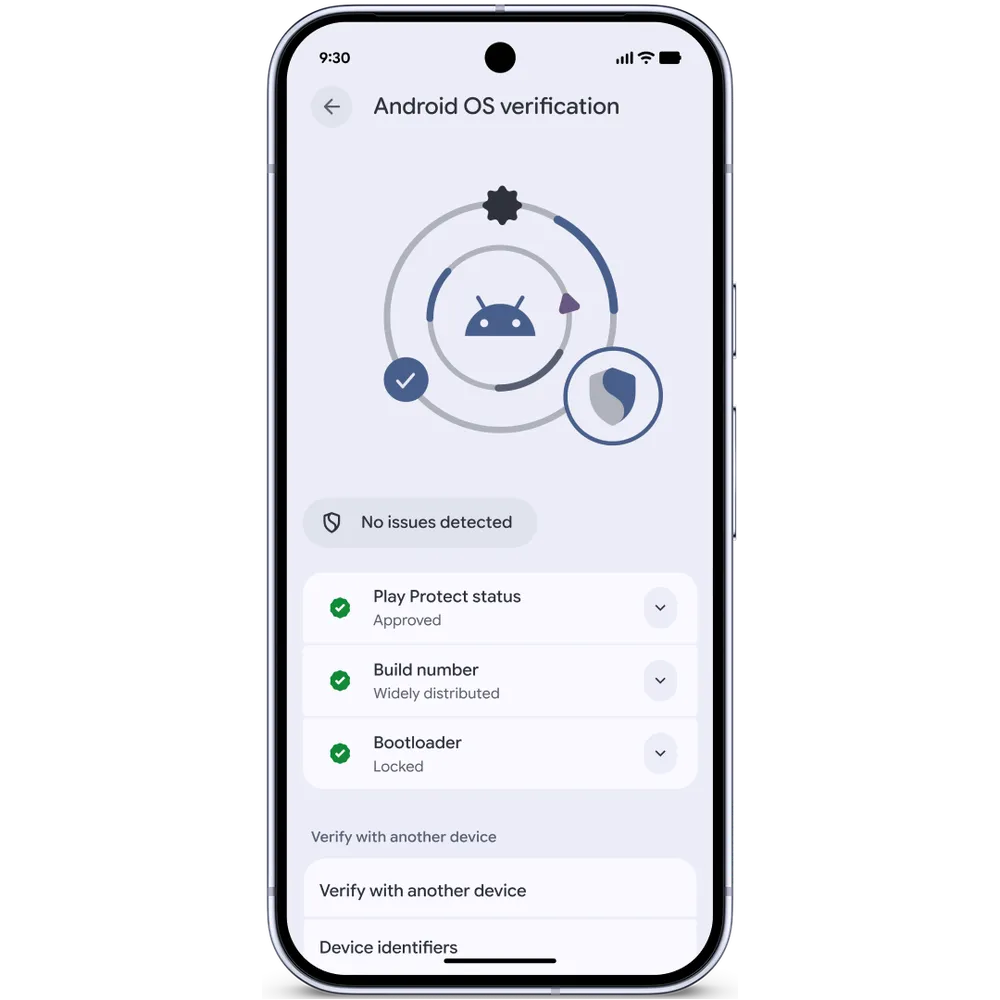
With Android 17, Google is also launching an Android OS verification feature. This new feature, which is initially being introduced on Pixel devices, helps you check whether your device is running an official, widely used version of the Android operating system.
You can find a full overview of the above measures and several others in this lengthy Google blog post.
This article originally appeared on our sister publication PC-WELT and was translated and adapted from German.

