For years, productivity software has forced an impossible choice: commit to rigid databases like Notion or embrace freeform chaos in tools like Obsidian. Tana’s supertag system dissolves this tradeoff entirely, proving that the future of productivity belongs to outliners with metadatav—vtools that let you write freely and add structure retroactively.
After bouncing between structured databases and flexible note-taking apps for years, I finally found something that doesn’t make me choose between capturing thoughts quickly and organizing them properly.
The productivity app dilemma we’ve all faced
Structure kills spontaneity
Here’s the problem most knowledge workers hit: databases demand upfront decisions. In Notion, before you can jot down a client meeting note, you’re creating properties, choosing select options, and building views. That friction means ideas die in your head before they reach the screen. I’ve abandoned countless Notion databases because the setup cost exceeded my motivation to maintain them.
Obsidian swings the opposite direction. You get pure markdown freedom, but connecting information requires manual linking and zero enforcement. I’ve watched my Obsidian vaults devolve into link graveyards where related notes sit isolated because I forgot to add the right tags or create the proper MOC (Map of Content).
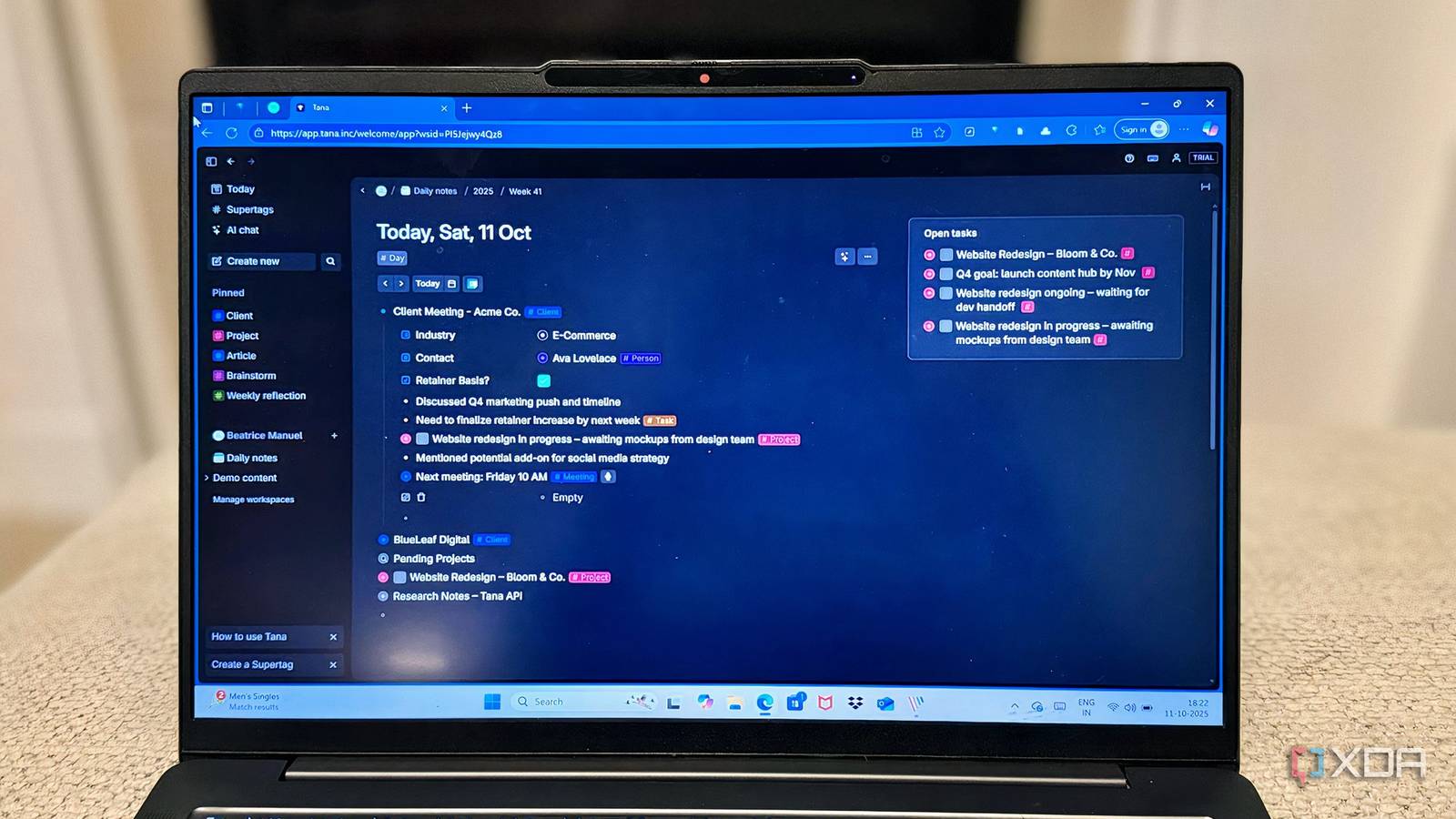
Tana bridges this gap by allowing any bullet point to be transformed into structured data via supertags. You write first in a freeform outliner, then layer on metadata only when it matters. The app treats organization as an enhancement, not a prerequisite.
Structure emerged from chaos
I’ve managed multiple consulting clients simultaneously, each with their own projects, deliverables, and timelines. In Notion, I’d built elaborate linked databases: a Clients table connecting to Projects, which in turn linked to Tasks, with rollups calculating bandwidth. It worked, but adding a quick client note meant navigating three database layers.
In Tana, I created a #client supertag with fields for industry, retainer amount, and project status. During client calls, I naturally type bullets. When I tag a node with #client, those fields appear — but they don’t interrupt my flow if I ignore them. I can add the retainer amount later, or never, and the system doesn’t break.
The magic happened when I tagged project bullets underneath client nodes with #project. Tana automatically surfaces all projects tagged to a specific client without me having to build views or relationships. I get Notion’s relational power through spatial hierarchy instead of explicit linking. When I’m in my “Active Projects” view — a simple search for #project where status equals “In Progress” — Tana shows me which client each project belongs to because it inherits that context.
This feels like the future because it mirrors how we actually think. We don’t mentally separate “this is client data” from “this is a thought about that client.” Tana’s supertags let information exist as both simultaneously.
Project planning without the database overhead
Flexibility met accountability

When I started planning a client website redesign, I didn’t map out timelines, phases, or trackers in advance. I just created a single node called “Website Redesign – XYZ Client Name” and began outlining what came to mind, be it discovery goals, design ideas, feedback notes, or deadlines.
Later, I tagged parts of that outline: the main node as #project, each phase as #phase, and a few bullets as #task. Suddenly, everything became searchable and grouped without me ever having to build a “system.”
That’s the magic: Tana lets structure grow with your work. I could add new fields to any supertag — say, “priority” for tasks or “budget” for projects, and it would instantly apply everywhere. I didn’t have to rebuild or duplicate anything.
It feels like project management that evolves as you think, not something you have to plan before you start thinking.
Knowledge management became effortless

I’ve tried dedicated spaced-repetition apps like Anki, but they require you to pre-commit to memorizing something. By the time I’ve decided a concept matters enough to create flashcards, I’ve already forgotten half of it.
In Tana, I created a #learn supertag with fields for topic, confidence level, and next review date. While reading documentation or taking notes, I tag key concepts with #learn inline. The information stays in its original context, tied to the project or article where I encountered it, but it’s now also pulled into my spaced repetition system.
I built a simple search: show me all #learn nodes where the next review is today or earlier. Every morning, I review those items, update their confidence level, and Tana automatically adjusts the review date using a field calculation. It’s spaced repetition that happens inside your actual work context, not in a separate flashcard silo.
This worked because Tana didn’t make me choose between capturing knowledge and systematizing it. The same bullet that documents a technical concept in my project notes also functions as a reviewable learning item. No exporting, no syncing, no duplicate entry.
Why this signals a shift in productivity software
The outliner-database hybrid is inevitable

Tana proved something crucial: the next generation of productivity tools will blend the flexibility of an outliner with the structure of a database. Users shouldn’t have to choose between capturing thoughts naturally and organizing them systematically. Tana takes it further by making metadata native to the outliner itself, rather than bolted on via frontmatter or properties panels. The progression is clear. Tools are moving toward letting structure emerge from content rather than requiring it up front.
While traditional database apps like Airtable and Notion might be a better fit for some and won’t disappear, they’ll need to adopt this “write first, structure later” philosophy. The friction of pre-defining schemas is too high for how most knowledge work actually happens. We think in streams, not tables.
Meanwhile, pure Markdown tools like Obsidian face pressure to add first-class support for structured data. Tags and YAML frontmatter are approximations of what supertags accomplish natively. The apps that win will be those that make metadata as fluid as text itself.
Tana’s supertag system goes beyond being “just a clever feature.” It’s a proof of concept that productivity software can be both flexible and structured, both spontaneous and systematic. That combination is the only way forward.