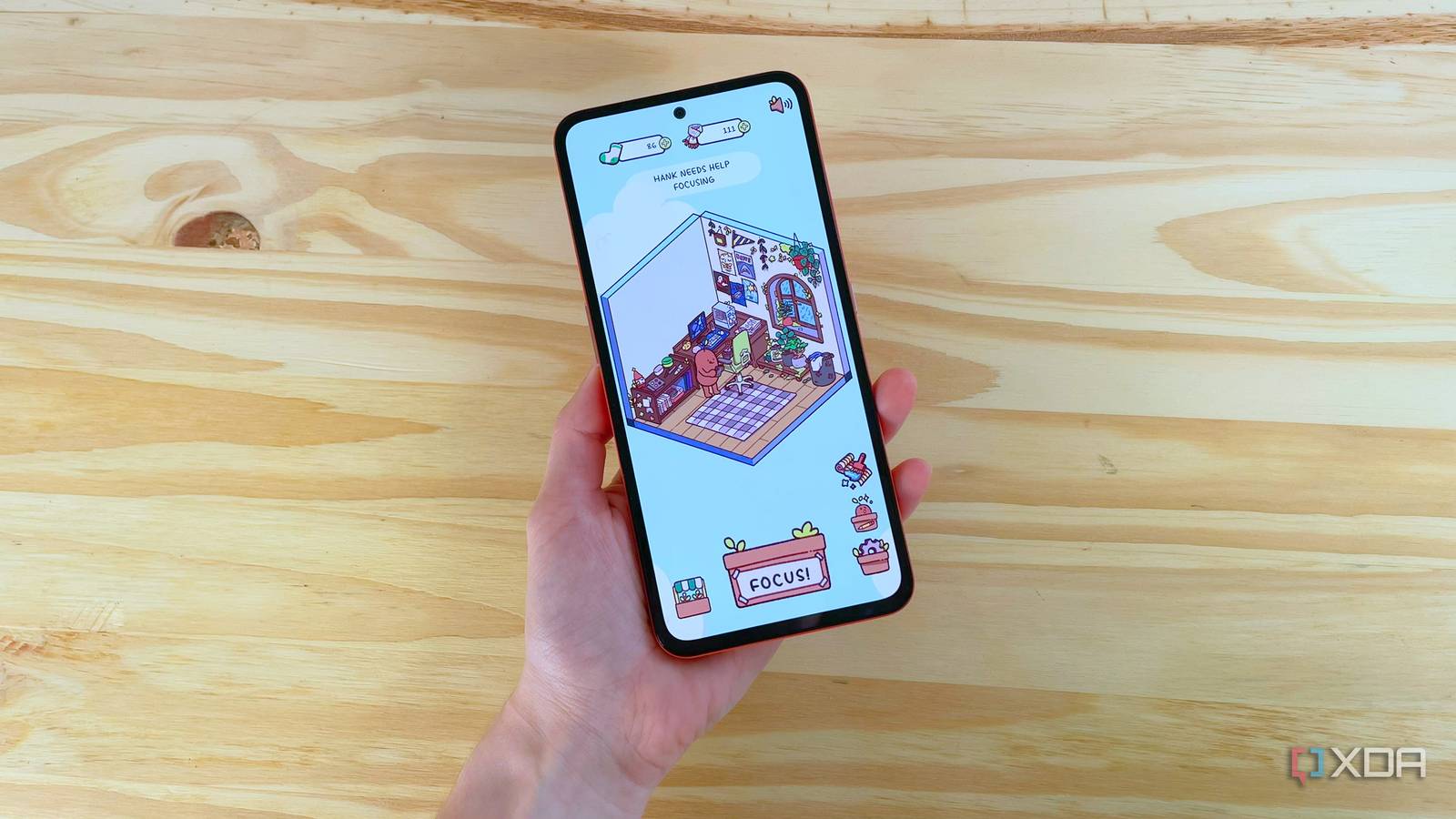
Last week, I discovered my new favorite focus app, and it might just be the perfect tool to help you concentrate. There are plenty of focus apps out there, but most haven’t worked for me for one reason or another, whether it’s distracting ads, too many paywalls, or a lack of engaging features.
For the past week, though, I’ve been focusing with the help of a little bean on my phone. It’s exactly as silly as it sounds, but this app is surprisingly good at what it does and has legitimately helped me spend less time getting distracted on my phone with a shockingly simple mechanic.
Here’s a look at my experience trying out Focus Friend and how it compares to other top focus apps out there.
Focus Friend: A free and distraction-free focus app
The bean on my phone that knits socks when I focus


Focus Friend is a cozy, straightforward focus app where you decorate a room for an anthropomorphic bean by staying focused. When you have your focus timer running, your bean knits socks, which you can use to buy decor. If you get Focus Friend Pro, your bean will also knit scarves you can use to buy some premium items.
Focus Friend is fully functional without paying a cent, though. It’s also completely ad-free and doesn’t collect or share your data. The items you unlock with Focus Friend Pro are cool (currently, they include frog and space themes), but the majority of the items in the app don’t require a premium subscription.


What I love about this app is how simple and effective it is, without seeming annoying. When you start a focus timer, your bean starts knitting. You can stop the timer early if you want, but your bean will be visibly sad, and all of their knitting will unravel (meaning you won’t earn any socks). It might be silly, but the slight inconvenience of seeing my bean disappointed is often enough to make me go, “Okay, surely I can keep working on this for five more minutes.”
Plus, earning socks and scarves to buy new furniture items is a fun side task. The prices are a bit high compared to how many socks you earn per session, but that helps keep Focus Friend interesting over a longer period of time (as opposed to being able to earn all the items in a week or two and getting bored).
It’s worth noting that Focus Friend was created in part by Hank Green, who many will know from the Crash Course YouTube channel. Bean cosmetics inspired by Hank and his brother, author John Green, are available in the premium shop. I didn’t buy one, but I named my bean Hank anyway, in honor of the guy who helped me pass chemistry class back in high school.
Focus Friend vs ChickFocus, Forest, and Study Bunny
What Focus Friend gets right that other focus apps don’t


Focus Friend is far from the first focus app with a cute character to take care of. There are plenty of other apps out there that gamify concentration, like ChickFocus, Forest, and Study Bunny. I’ve tried all three, and Focus Friend is still my favorite for a few reasons.
First, Focus Friend has the best balance of cost and features in my experience. You can use all of the app’s features without paying anything and without getting ambushed by ads. Study Bunny is also free and has a similar theme of customizing a little avatar, but the very first thing you see when you open the app is a request to allow tracking for personalized ads. That was enough to put me off using that particular focus app.
ChickFocus is a bit better, but still locks basic features, like customizing the length of your timers, behind a paywall. It’s good if you just need a standard Pomodoro timer and want a cute baby crow avatar to represent that timer. Beyond that, ChickFocus lacks the amount of customization Focus Friend offers, and it’s only available on iOS.
I’ll admit, Forest is a pretty good focus app. I used it now and then until I found Focus Friend. The one major downside to Forest is that it’s a paid app. That allows it to be ad-free, which is great, but it creates a barrier to entry that prevents you from trying the app before paying for it. Forest also asked for permission to track my activity outside the app, which I blocked.
Getting more done with the help of a little bean

If you struggle to stay focused like I do, using a focus app or a Pomodoro timer can be a big help. The cozy customization elements of Focus Friend also help me de-stress between tasks when I’m working on a big project. They give me something to work towards (usually buying furniture), but don’t make it annoying to meet goals.
For me, that’s the perfect balance to motivate me to concentrate without adding to my stress. It might be the perfect balance for you, too, so I recommend giving Focus Friend a try if you’re looking for a fun and cozy focus app. If you’re looking for more tools to expand your productivity, you can also use Focus Friend with a to-do list app or a note-taking app like Obsidian or Anytype.
f

